beyond teck

  • Subscribe to our RSS feed.
  • Twitter
  • StumbleUpon
  • Reddit
  • Facebook
  • Digg
Showing posts with label peripherals. Show all posts

Tuesday, 29 July 2008

5 Cool Tips for Creating Better Scans

Posted on 12:04 by Unknown

If you tend to scan a lot of stuff, these tips might be really helpful. A while ago, I had to scan a whole book, and I realized that the default scan settings just weren't good enough. Especially for pictures and mathematical notations. They just don't seem to come out properly. So if you would like to tweak your scanner settings to create better quality scans then read on...

Turn off Auto Cropping

The number one problem I find that my scanner (notice I say my scanner, which might mean that such problems might be confined only to the scanner I have) does not seem to do a good job if I simply set the mode for scanning. Nor does it scan everything I place on the flat bed, it seems to crop things out, thinking it to be unimportant. Not only it this super annoying, but it also wastes a lot of time, so here are a couple of settings (applying these settings will of course, differ depending on your scanner, so you'll have to check the manual)

In my case, it was opening up the set-up utility, going to advanced settings for scans and selecting the area to be scanned. Since most of the stuff I scan in letter format, I usually keep it on letter.

selectareascanned

Choosing the right DPI

Usually, scanner do not scan at a high DPI, unless you specify it to. However, unless you're really running low on hard disk space, I recommend that you should bump up the DPI settings to at least 300 DPI. Yes, the time it takes to scan something will take much longer, but the quality will be much better. Of course, once you have the actual scans you can do whatever you want with them, even reduce the quality if need be. Plus, if you were to print out (especially if you were to create big size posters) these picture or documents that were scanned at a high DPI, the image quality of the overall print will be significantly better. So, if you have the option, make sure you scan at 300 or the highest DPI possible.

highdpiscan

Always scan everything in colour

Why would you scan things in black and white, if you're transferring the data to your computer instead of directly printing it out. Scanning in colour gives you the option to do whatever you want with it once you've scanned it. I also find that a lot of detail is ignored by the scanner when it scans simply in black & white. If you want to be on the safe side, I'd say colour is the way to go.

Scanning dark text on a light background

Often, I find that scans of light text on a dark background are less than satisfactory. Especially if the light text is white and the dark background is black. It seems that most scanners have the options of specifying the brightness of the image being scanned, so in such cases it is best to bump up the brightness a little bit. It might help in getting a better result.
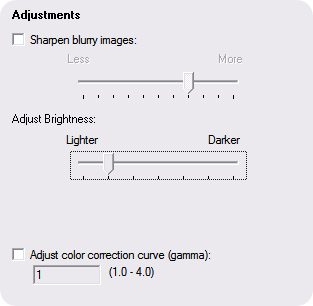
adjustments

Remove Patterns on Paper

Another great features that scanners have is to automatically, although not accurately, detect any unwanted patterns in the background of the item being scanned. For example, if the paper you are scanning is a bit crinkled, it will automatically try to remove the marks on the paper, resulting in a better scan overall.
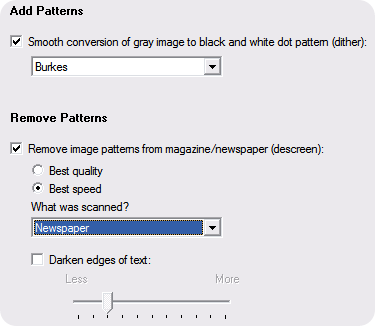
addpatterns

Following the tips above when you scan something will assuredly improve the quality of scans.

Read More
Posted in peripherals, tip | No comments
Older Posts Home
Subscribe to: Posts (Atom)

Popular Posts

  • Contact Me!
    Okay so you want to contact me for something? No Problem! E-Mail You can send all your questions , comments , tips (I need a lot of those)...
  • WeTransfer Job Ad
    I like using WeTransfer to transfer things that don't fit in emails, mainly because the site is fast, has a large upload limit (2GB!) an...
  • 5 great add-ons for Internet Explorer 7
    If you haven’t yet upgraded to Internet Explorer 7, I’d say its high time you do so. If you’re still using IE 6, you’re missing out on a lot...
  • Adium Update
    Looks like Adium (or Adium X) was updated. Now of course Adium isn't the messenger I use most (I use Trillian + Windows Live Messenger...
  • The reason why Windows Vista was experiencing problems
    Off late, my Windows Vista Ultimate install was experience a slew of problems, which might explain the reason I had 10 GB of error reporting...
  • The plan for summer
    So summer has started, at least it has for most students in North America. This summer is different. I can almost feel it (interestingly eno...
  • The Nintendo Wii..
    The first thing that comes to my mind is the Wheee! Firefox flick by Jeff Gill. Except this time the IE logo is replaced by the Nintendo Wi...
  • Todays thoughts
    Great news, now you can get a newer version of the great performancing extension from the mozilla site. This version has many new features,...
  • How to play tetris on your Mac with Terminal
    Today, I noticed that it's the 25th anniversary of Tetris, through a Google doodle (you can learn some amazing things from a Google logo...
  • A list of things that I'm working on right now...
    Okay, as a tech enthusiast I can't stop working on something that I've started already. Unfortunately, because of school all of thes...

Categories

  • addons
  • adobe
  • ads
  • adsense
  • apple
  • audio
  • blackberry
  • blog
  • blogger
  • blogging
  • cars
  • cellphones
  • clean
  • code
  • comments
  • cricket
  • downloads
  • ebooks
  • email
  • error
  • file sharing
  • firefox
  • fixes
  • free
  • games
  • gas
  • Gmail
  • google
  • hack
  • hotmail
  • installs
  • instant messaging
  • internet
  • internet explorer
  • ipod
  • laptop
  • Linux
  • Live Writer
  • lol
  • Mac
  • mac. mail
  • mail
  • messenger
  • microsoft
  • Microsoft Word
  • money
  • msn
  • music
  • Musings
  • network
  • news
  • online
  • Outlook
  • page
  • peripherals
  • phones
  • photo
  • photoshop
  • php
  • plagiarism
  • problems
  • productivity
  • programming
  • projects
  • rant
  • Registry
  • Review
  • school
  • Screenshots
  • search
  • security
  • software
  • spam
  • speech
  • speed up windows
  • spyware
  • sysfader
  • technology
  • tip
  • tricks
  • tutorials
  • ubuntu
  • updates
  • video
  • virus
  • voip
  • web
  • wi-fi
  • Windows
  • Windows 7
  • Windows Vista
  • Windows XP
  • wireless
  • work
  • wtf
  • youtube

Blog Archive

  • ▼  2013 (5)
    • ▼  October (2)
      • WeTransfer Job Ad
      • iPhone Searching... No Service/No Reception Problem
    • ►  August (2)
    • ►  March (1)
  • ►  2012 (6)
    • ►  December (1)
    • ►  October (1)
    • ►  June (1)
    • ►  May (1)
    • ►  January (2)
  • ►  2011 (19)
    • ►  October (1)
    • ►  August (1)
    • ►  July (8)
    • ►  June (1)
    • ►  February (4)
    • ►  January (4)
  • ►  2010 (41)
    • ►  November (1)
    • ►  October (3)
    • ►  September (3)
    • ►  August (2)
    • ►  July (12)
    • ►  June (2)
    • ►  May (5)
    • ►  April (3)
    • ►  March (4)
    • ►  February (4)
    • ►  January (2)
  • ►  2009 (59)
    • ►  December (1)
    • ►  November (1)
    • ►  October (1)
    • ►  September (3)
    • ►  August (4)
    • ►  July (4)
    • ►  June (14)
    • ►  May (1)
    • ►  April (3)
    • ►  March (3)
    • ►  February (4)
    • ►  January (20)
  • ►  2008 (108)
    • ►  December (22)
    • ►  November (10)
    • ►  October (14)
    • ►  August (13)
    • ►  July (13)
    • ►  June (6)
    • ►  May (13)
    • ►  April (10)
    • ►  March (5)
    • ►  January (2)
  • ►  2007 (33)
    • ►  December (8)
    • ►  November (1)
    • ►  October (4)
    • ►  September (10)
    • ►  August (1)
    • ►  July (2)
    • ►  June (1)
    • ►  May (2)
    • ►  April (1)
    • ►  February (2)
    • ►  January (1)
  • ►  2006 (137)
    • ►  December (1)
    • ►  November (1)
    • ►  October (1)
    • ►  August (1)
    • ►  July (3)
    • ►  June (9)
    • ►  May (20)
    • ►  April (22)
    • ►  March (33)
    • ►  February (20)
    • ►  January (26)
  • ►  2005 (55)
    • ►  December (12)
    • ►  November (19)
    • ►  October (9)
    • ►  September (15)
  • ►  2001 (1)
    • ►  January (1)
Powered by Blogger.

About Me

Unknown
View my complete profile