beyond teck

  • Subscribe to our RSS feed.
  • Twitter
  • StumbleUpon
  • Reddit
  • Facebook
  • Digg
Showing posts with label speed up windows. Show all posts

Monday, 4 August 2008

How to check for memory problems with Windows on slow computers

Posted on 09:23 by Unknown

RAM If you’re computer is running really slow off late, Windows might not be the only culprit to blame. Chances are that your hardware is at fault too. In this case clearing junk on your computer, or tweaking your computer settings wont help you. Sometimes, although it is not all too common, your memory can actually fail, causing your computer to seem really slow. Simple things such as dust on the connectors can also impact your memory significantly. However, before you open your computer, here’s how you can use the inbuilt Windows Memory Tool in Windows Vista or other third party software to check for memory problems. Keep in mind though that if you’re not comfortable with checking for such problems yourself, it might be a better idea to take the computer to a trusted local electronic shop to let them check it for you for a small fee, which is of course better than loosing all your data.

Using Windows Vista Memory Diagnostics Tool to Check for Problems

Windows Vista comes with a great tool to help check for memory problems. Of course, as usual, you’ll need admin privileges to continue.
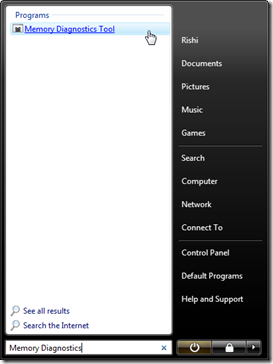
  1. Click Start
  2. Type in Memory Diagnostics in the Start Search box
  3. Click on the Memory Diagnostics Tool Entryimage
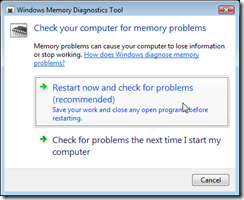
  4. Then in the tool that pops-up click on Restart now and check for memory problems. Unless you’re working on something at the moment, in which case choose the ‘Check for problems the next time I restart my computer option’image
  5. Once you restart windows will automatically perform some memory tests. And when you log in, it’ll show you the results. If it says everything is fine then your computer has no memory problems. However, if it says memory errors, then you’ll have to replace the RAM on your computer.

nomemoryerrors 

In this case shown above (which was the case of my laptop after I replaced the faulty ram DIMM in my laptop) the computer does not have any memory problems, however if this were to show that ‘Memory Errors were Detected’ (like shown below) then it is recommended that you check your memory cards (to remove any dust etc.) of replace them if necessary to prevent system crashes and slow downs.

MemoryProblems

Alternatively, if you use Windows XP, you can take advantage of your manufacturer’s utility partition to perform similar memory tests. Most manufacturers, like Dell, HP, Acer and many more put utility partitions on the hard drive with diagnostic tools to check memory and other hardware problems. So you’ll have to refer to the manual to learn how to use the tools. You can also use a wonderful piece of software called Memtest86, which does much the same tasks. Although I think it is much easier to use the manufacturer’s utility, as it does not involve downloading and burning (as you’ll have to use the CD/Floppy drive to perform memory tests instead of hard drive) anything. Nonetheless, well documented instructions on how to use Memtest can be found on several sites on the Internet.

Read More
Posted in speed up windows, tip, Windows | No comments

Saturday, 3 May 2008

Free up disk space and get rid of junk on your PC

Posted on 04:52 by Unknown
It is a well known fact that computers tend to get slower as time goes by and so does the hard drive space. If you're in such a situation then here are a couple of things you can do to get rid of all the junk on your Windows XP or Vista computer. Additionally, the speed at which the computer will run at will also significantly improve. These tips area also especially useful if you're getting those low disk space errors.

Option 1: Using Disk Cleanup

The first and foremost thing that you can do to clean up the junk on your system without downloading anything is use the appropriately named built-in utility in Windows (both XP and Vista have this) known as Disk Cleanup.

To access this click on Start > All Programs > Accessories > System Tools > Disk Cleanup. A window will pop-up saying that it is looking for Junk in your Hard Drive. If you have one or more hard drives or partitions, Windows will then ask you a partition to choose.


Once Windows finishes doing this, it will show you an overview of the junk/unnecessary files on your PC. You can then pick and choose the things that you dont need and click OK. I usually delete all the files Windows thinks is not necessary for normal functioning. However, sometimes doing so is not a good idea. So, my advice is that if you are running this tool for the first time, go through all the options and read what it says in the box below.


If you want to delete more things, switch to the More Options Tab where you can delete system restore files etc. But don't get too excited that you'll be able to reclaim a lot of space and delete all the restore files, if you do so then you might not be able to recover your system to a working state in case of a problem.

Option 2: Using Crap Cleaner (CCleaner)

Crap Cleaner (also known as CCleaner...) is a much more powerful application that can delete a whole lot more from your system. And, if you use browsers such as Firefox, it can help you even delete the cookies that are associated with Firefox, which of course Disk Cleaner is incapable of doing.

Using CCleaner is dead simple. All you need to do once you download the application (you can download it here is open it and choose the things you would like to delete. One thing you might want to keep in mind during installation is that the CCleaner installer at one point asks you if you want to install the yahoo toolbar. If you blindly click yes then it will install it for you, so if you're like me and don't want any additional toolbars you might want to pay attention while installing it.

As you can see from the screenshot above, the interface is very trivial. Simply click Analyze for CCleaner to take a sneak peek at your data and then click Run Cleaner to delete the Junk on your system. You can also use CCleaner to delete unnecessary registry entries for more information on doing so refer to my post on the real way to keep the Windows registry tidy. Also, please BACK UP THE REGISTRY before you use the delete unnecessary registry features.

BONUS TIP: If you have just invested in a new windows computer, especially if it is a Dell or Sony or a computer from an OEM you might want to get rid of the junk that comes with it. To do so please take a look at my post on how to delete junk that comes with a new computer.
Read More
Posted in downloads, free, speed up windows, Windows | No comments

Tuesday, 16 May 2006

What is Sysfader.exe and how to stop sysfader errors

Posted on 20:43 by Unknown

What is sysfader.exe?


Well, no first of all, it is not spyware (usually... click here to check if its spyware or not »). In fact it is a part of Windows XP that provides all the so called "cool animation effects". These include fading menus in and out. Animating windows and so on. However, the fact is that you don't need sysfader on your computer. You're better off without it, especially if you're getting a lot of 'Sysfader.exe has crashed' errors or if your computer is running slow. Even if you don't think it's slow I recommend you read the whole article below.
Important: Make sure you take a look at how to figure out if sysfader is a virus or not and find out if the sysfader.exe you are seeing is a virus/spyware or if it's the real deal.

I also read a couple of e-mail from people telling me that they had an error regarding sysfader.exe. I'm guessing that this might be a common problem for a lot of people, besides the tips mentioned in this post are good for any computer running Windows. Be it Windows XP or Windows Vista (although the instructions for disabling unnecessary effects are different for Vista).
Note: Please see an alternate way to fix sysfader.exe problem in this post »

To get rid of this problem all you need to do is this:
  1. Press Windows Flag (Windows Key) + Pause break key. If you don't have the Windows key (most keyboards should have this - right beside the Alt key) just right click on My Computer and click Properties.
  2. Go to the 'Advanced' tab
  3. Under 'Performance' click on 'Settings'
  4. Under the 'Visual Effects' tab uncheck the first four check boxes
  5. These 4 boxes are "Animate windows when minimizing and maximizing", "Fade or slide menus into view", "Fade of slide ToolTips into view" and "Fade out menu items after clicking". Please note that if you are running other localizations of Windows XP (for example Windows XP Portugese) you have to find the options that somewhat describe the options mentioned above, since they might not be the first 4 options.
  6. To make your computer even more faster, uncheck other checkboxes for the effects that you feel you can live without, for example "Slide taskbar buttons" etc...
  7. If you like your Windows XP theme the way it is don't uncheck the last option that says "Use visual styles on windows and buttons". I also recommend you leave the "smooth edges of screen fonts" and "Use common tasks in folders" options unchecked"
  8. If you don't use a wallpaper then I recommend you also uncheck "Use drop shadows for icon labels on the desktop"
  9. Click on 'OK'
After doing this the problem with sysfader should instantly go away (hopefully). And your computer is going to become much more faster without those annoying (at least I find it annoying) effects slowing it down. Please read other articles on how to make windows xp faster if you want to make your computer faster, and get rid of other .exe errors with windows that seem to happen oh so frequently.
Read More
Posted in error, fixes, speed up windows, sysfader, Windows Vista, Windows XP | No comments
Older Posts Home
Subscribe to: Posts (Atom)

Popular Posts

  • 5 great add-ons for Internet Explorer 7
    If you haven’t yet upgraded to Internet Explorer 7, I’d say its high time you do so. If you’re still using IE 6, you’re missing out on a lot...
  • WeTransfer Job Ad
    I like using WeTransfer to transfer things that don't fit in emails, mainly because the site is fast, has a large upload limit (2GB!) an...
  • Contact Me!
    Okay so you want to contact me for something? No Problem! E-Mail You can send all your questions , comments , tips (I need a lot of those)...
  • The Nintendo Wii..
    The first thing that comes to my mind is the Wheee! Firefox flick by Jeff Gill. Except this time the IE logo is replaced by the Nintendo Wi...
  • Installing Ubuntu without a CD drive using USB drive
    With the latest release of Ubuntu, I feel that more people will have access to a highly mature, fast and easy to use operating system. But u...
  • How we depend on technology in school
    Today I was just finishing up my Geo project and I realized (just like my other 'realization' moments that I've documented in t...
  • How to find out if a .exe process is spyware or virus
    Windows XP has thousands and thousands of .exe files, and usually a lot of those executables are running at any given time. But are all of t...
  • How to watch cricket online for free
    I have a confession to make - I'm addicted to cricket. I pretty much can't live without watching cricket matches (especially if Indi...
  • Adium Update
    Looks like Adium (or Adium X) was updated. Now of course Adium isn't the messenger I use most (I use Trillian + Windows Live Messenger...
  • How to reduce PDF file sizes on a Mac
    Update : Doesn't seem like this method works well for all files, you may want to try out the link posted in the comments, as this seems ...

Categories

  • addons
  • adobe
  • ads
  • adsense
  • apple
  • audio
  • blackberry
  • blog
  • blogger
  • blogging
  • cars
  • cellphones
  • clean
  • code
  • comments
  • cricket
  • downloads
  • ebooks
  • email
  • error
  • file sharing
  • firefox
  • fixes
  • free
  • games
  • gas
  • Gmail
  • google
  • hack
  • hotmail
  • installs
  • instant messaging
  • internet
  • internet explorer
  • ipod
  • laptop
  • Linux
  • Live Writer
  • lol
  • Mac
  • mac. mail
  • mail
  • messenger
  • microsoft
  • Microsoft Word
  • money
  • msn
  • music
  • Musings
  • network
  • news
  • online
  • Outlook
  • page
  • peripherals
  • phones
  • photo
  • photoshop
  • php
  • plagiarism
  • problems
  • productivity
  • programming
  • projects
  • rant
  • Registry
  • Review
  • school
  • Screenshots
  • search
  • security
  • software
  • spam
  • speech
  • speed up windows
  • spyware
  • sysfader
  • technology
  • tip
  • tricks
  • tutorials
  • ubuntu
  • updates
  • video
  • virus
  • voip
  • web
  • wi-fi
  • Windows
  • Windows 7
  • Windows Vista
  • Windows XP
  • wireless
  • work
  • wtf
  • youtube

Blog Archive

  • ▼  2013 (5)
    • ▼  October (2)
      • WeTransfer Job Ad
      • iPhone Searching... No Service/No Reception Problem
    • ►  August (2)
    • ►  March (1)
  • ►  2012 (6)
    • ►  December (1)
    • ►  October (1)
    • ►  June (1)
    • ►  May (1)
    • ►  January (2)
  • ►  2011 (19)
    • ►  October (1)
    • ►  August (1)
    • ►  July (8)
    • ►  June (1)
    • ►  February (4)
    • ►  January (4)
  • ►  2010 (41)
    • ►  November (1)
    • ►  October (3)
    • ►  September (3)
    • ►  August (2)
    • ►  July (12)
    • ►  June (2)
    • ►  May (5)
    • ►  April (3)
    • ►  March (4)
    • ►  February (4)
    • ►  January (2)
  • ►  2009 (59)
    • ►  December (1)
    • ►  November (1)
    • ►  October (1)
    • ►  September (3)
    • ►  August (4)
    • ►  July (4)
    • ►  June (14)
    • ►  May (1)
    • ►  April (3)
    • ►  March (3)
    • ►  February (4)
    • ►  January (20)
  • ►  2008 (108)
    • ►  December (22)
    • ►  November (10)
    • ►  October (14)
    • ►  August (13)
    • ►  July (13)
    • ►  June (6)
    • ►  May (13)
    • ►  April (10)
    • ►  March (5)
    • ►  January (2)
  • ►  2007 (33)
    • ►  December (8)
    • ►  November (1)
    • ►  October (4)
    • ►  September (10)
    • ►  August (1)
    • ►  July (2)
    • ►  June (1)
    • ►  May (2)
    • ►  April (1)
    • ►  February (2)
    • ►  January (1)
  • ►  2006 (137)
    • ►  December (1)
    • ►  November (1)
    • ►  October (1)
    • ►  August (1)
    • ►  July (3)
    • ►  June (9)
    • ►  May (20)
    • ►  April (22)
    • ►  March (33)
    • ►  February (20)
    • ►  January (26)
  • ►  2005 (55)
    • ►  December (12)
    • ►  November (19)
    • ►  October (9)
    • ►  September (15)
  • ►  2001 (1)
    • ►  January (1)
Powered by Blogger.

About Me

Unknown
View my complete profile