beyond teck

  • Subscribe to our RSS feed.
  • Twitter
  • StumbleUpon
  • Reddit
  • Facebook
  • Digg
Showing posts with label youtube. Show all posts

Tuesday, 1 July 2008

Convert Youtube FLV files to AVI, WMV and MP3 for Free with VLC

Posted on 11:09 by Unknown
Many people who use VLC don't know this but you can actually use it to convert a file from one format to another. You can also use it to extract the audio out of a audio/video file like a FLV file. (This also works for VOB files too). The instructions for doing so are pretty simple. First you might want to download the video that you'd like to convert into MP3 or WMV or AVI or... you get the point. Although you can use online websites to do this for you doing it this way gives you much more control, which is a good thing.

And you'll need Videolan's VLC too. So you might want to download that before you proceed.

How to convert from Youtube/Myspace/iFilm FLV to AVI/WMV/MP4/MP3 and so on really fast and completely for free

1. Once you download the FLV video, you'll have to open it with VLC first. To do that just drag and drop the video file onto VLCs icon, or open it up through VLC by going into File > Open File...> Browse for your .FLV file
2. Once it starts playing, let it load completely... I suggest that you watch the video till the end before you start.
3. Then stop the video and click on File > Streaming/Exporting Wizard...


4. In the window that pops-up select 'Transcode/Save to file' and click Next


5. Select 'Existing Playlist Item' and choose the video that you'd like to encode


6. Check Transcode Video and Transcode Audio and choose your settings for exporting. If you just want MP3 audio then only check 'Transcode Audio' and click Next.
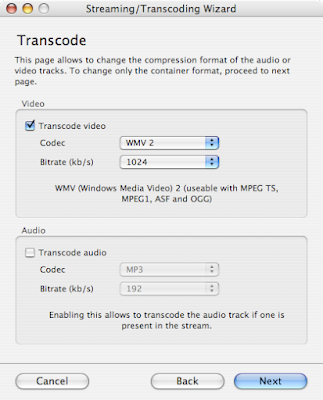

7. Choose your encapsulation format and click Next


8. Choose the location for your file and give it a name


9. Click on Finish and let VLC do its job!

There you have it! A free way to get your videos from the FLV format to pretty much any format you wish. Plus it takes a lot less time than online websites.
Read More
Posted in downloads, free, tip, youtube | No comments

Convert online FLV Videos to MP3 or AVI or WMA...

Posted on 10:20 by Unknown
Note: Often the videos of songs on youtube are copyrighted material that belong to the record company. Downloading such videos or converting to them to MP3s might be illegal. Also, the quality of audio embedded in youtube videos is extremely poor and I'd rather not listen to the song at all than to create a MP3 of it from youtube.

So, I'd only recommend you use the following ways if in fact you don't have any other viable option left. You can also read about using VLC to convert/transcode youtube videos to ANY format that you like including AVI, WMA, MP4 and so on. Of course you'll need to know how to download the videos from such sites first.

Method 1: Using an online website

Yes, it is actually possible to create a website that is going to take the video from youtube and encode it into a usable MP3 file. Although this option might be the easiest, it takes the longest time. And if you consider yourself to be a bit tech savvy then you might want to skip to method 2.

VidtoMP3 - A service that takes youtube and myspace videos, digests them and spits out a MP3 file. A lot of annoying banner ads on this site though.


Vixy - Another service that takes flv video of all sorts and converts it into something more usable.

Method 2: Using an application to do it

If you're on windows there are a lot of freeware applications out there that can do this for you - however beware of malware causing apps that pretend to be freeware. Some good ones that I like are:

FLV to MP3 Converter - A free converter that lets you convert FLV videos from online video sharing websites to an MP3 and provides ample choices on how you'd like to do it. You can change the bitrate and so on to meet your preferences (and disk space). You're going to need the FLV file on your computer firs though... if you don't know how to do that you can check this post.

VLC - You can learn more about using VLC to do this in this post.
Read More
Posted in free, tip, youtube | No comments

Download online .FLV videos from any site including Youtube on Macs

Posted on 10:00 by Unknown
If you have a mac, then your life is going to be a whole lot easier when it comes to downloading videos. Safari, a web browser that I really adore because of its 'lightweight' factor and speed can do more than just display webpages. It can also show the videos that are being loaded in the background, providing you with the URL of the video that you're about to view - which of course makes it all the more easier for you to download the video. You can of course use other methods mentioned in this post, but why sweat it when you have an easier way? Here's how you can perform the feat:

Step 1: Get the Activity and Downloads window ready

1. After you've selected the perfect target (i.e. the video that you'd like to download) click on Window in the Menubar
2. Then click on Downloads - the download window will pop-up... once it does just place it beside your desktop
3. Then click on Window again and click on Activity

Step 2: Getting the video

Refresh the webpage if you're on the webpage that has the video or navigate that webpage. Once the webpage starts loading, you'll notice that Safari starts downloading a big file in the Activity Window. This file will usually be greater than 2 MB or so, but nevertheless it will be the biggest file. This is the .FLV video file that Safari is loading... the file you need to download.

Quickly click on the file in the Activity window then press Command + C then click on the Download window and paste the file in there using the keyboard shortcut Command + V. Safari will then start downloading the file to your desktop! You can then convert the file to a much more usable format.

In the screenshot below (click to magnify) the highlighted file is the file that is being downloaded...


Read More
Posted in Mac, tip, youtube | No comments

How to download online videos from any website!

Posted on 09:52 by Unknown
Although downloading videos from youtube is a shady activity, sometimes youtube videos have great content that are useful in presentations and other videos. So, point in mind, here's how you can download youtube videos.

There are primarily two ways of downloading youtube videos or videos from any other such website like metacafe, google, iFilm and pretty much any website that has videos in the FLV format, not just youtube. 

The first is to use a website that'll provide a link to the video download and the second is to use an application or extension that was meant to download youtube videos. If you use a mac then you can also use Safari to download youtube videos. If you want to convert the videos into AVI, WMV or MP3 files then you might want to take a look at this post.

Method 1: Download videos from Youtube using online websites

Keepvid.com - A great site that allows you to download videos from any online video website.


Vixy.com - A service that not only downloads the videos but also changes the format to a much more widely accepted format like a .AVI file or a .WMV file and so on. This take a longer time though, and I much prefer downloading the video first and using this method to convert the files.

Method 2: Using applications and extensions to download the video

Magic's Video Downloader - a great extension for Firefox that allows you to download from all different kinds of online video sites, all without leaving the webpage.


Youtube Downloader - A nice little tool to help you download videos from Youtube, Google Video, MyspaceTV etc.


In order to view these videos though you will have to convert them into some other formats, unless you have something like VLC which can play .FLV files and VLC can also convert it into something else for you.
Read More
Posted in downloads, free, youtube | No comments
Older Posts Home
Subscribe to: Posts (Atom)

Popular Posts

  • 5 great add-ons for Internet Explorer 7
    If you haven’t yet upgraded to Internet Explorer 7, I’d say its high time you do so. If you’re still using IE 6, you’re missing out on a lot...
  • WeTransfer Job Ad
    I like using WeTransfer to transfer things that don't fit in emails, mainly because the site is fast, has a large upload limit (2GB!) an...
  • Contact Me!
    Okay so you want to contact me for something? No Problem! E-Mail You can send all your questions , comments , tips (I need a lot of those)...
  • The Nintendo Wii..
    The first thing that comes to my mind is the Wheee! Firefox flick by Jeff Gill. Except this time the IE logo is replaced by the Nintendo Wi...
  • Installing Ubuntu without a CD drive using USB drive
    With the latest release of Ubuntu, I feel that more people will have access to a highly mature, fast and easy to use operating system. But u...
  • How we depend on technology in school
    Today I was just finishing up my Geo project and I realized (just like my other 'realization' moments that I've documented in t...
  • How to find out if a .exe process is spyware or virus
    Windows XP has thousands and thousands of .exe files, and usually a lot of those executables are running at any given time. But are all of t...
  • How to watch cricket online for free
    I have a confession to make - I'm addicted to cricket. I pretty much can't live without watching cricket matches (especially if Indi...
  • Adium Update
    Looks like Adium (or Adium X) was updated. Now of course Adium isn't the messenger I use most (I use Trillian + Windows Live Messenger...
  • How to reduce PDF file sizes on a Mac
    Update : Doesn't seem like this method works well for all files, you may want to try out the link posted in the comments, as this seems ...

Categories

  • addons
  • adobe
  • ads
  • adsense
  • apple
  • audio
  • blackberry
  • blog
  • blogger
  • blogging
  • cars
  • cellphones
  • clean
  • code
  • comments
  • cricket
  • downloads
  • ebooks
  • email
  • error
  • file sharing
  • firefox
  • fixes
  • free
  • games
  • gas
  • Gmail
  • google
  • hack
  • hotmail
  • installs
  • instant messaging
  • internet
  • internet explorer
  • ipod
  • laptop
  • Linux
  • Live Writer
  • lol
  • Mac
  • mac. mail
  • mail
  • messenger
  • microsoft
  • Microsoft Word
  • money
  • msn
  • music
  • Musings
  • network
  • news
  • online
  • Outlook
  • page
  • peripherals
  • phones
  • photo
  • photoshop
  • php
  • plagiarism
  • problems
  • productivity
  • programming
  • projects
  • rant
  • Registry
  • Review
  • school
  • Screenshots
  • search
  • security
  • software
  • spam
  • speech
  • speed up windows
  • spyware
  • sysfader
  • technology
  • tip
  • tricks
  • tutorials
  • ubuntu
  • updates
  • video
  • virus
  • voip
  • web
  • wi-fi
  • Windows
  • Windows 7
  • Windows Vista
  • Windows XP
  • wireless
  • work
  • wtf
  • youtube

Blog Archive

  • ▼  2013 (5)
    • ▼  October (2)
      • WeTransfer Job Ad
      • iPhone Searching... No Service/No Reception Problem
    • ►  August (2)
    • ►  March (1)
  • ►  2012 (6)
    • ►  December (1)
    • ►  October (1)
    • ►  June (1)
    • ►  May (1)
    • ►  January (2)
  • ►  2011 (19)
    • ►  October (1)
    • ►  August (1)
    • ►  July (8)
    • ►  June (1)
    • ►  February (4)
    • ►  January (4)
  • ►  2010 (41)
    • ►  November (1)
    • ►  October (3)
    • ►  September (3)
    • ►  August (2)
    • ►  July (12)
    • ►  June (2)
    • ►  May (5)
    • ►  April (3)
    • ►  March (4)
    • ►  February (4)
    • ►  January (2)
  • ►  2009 (59)
    • ►  December (1)
    • ►  November (1)
    • ►  October (1)
    • ►  September (3)
    • ►  August (4)
    • ►  July (4)
    • ►  June (14)
    • ►  May (1)
    • ►  April (3)
    • ►  March (3)
    • ►  February (4)
    • ►  January (20)
  • ►  2008 (108)
    • ►  December (22)
    • ►  November (10)
    • ►  October (14)
    • ►  August (13)
    • ►  July (13)
    • ►  June (6)
    • ►  May (13)
    • ►  April (10)
    • ►  March (5)
    • ►  January (2)
  • ►  2007 (33)
    • ►  December (8)
    • ►  November (1)
    • ►  October (4)
    • ►  September (10)
    • ►  August (1)
    • ►  July (2)
    • ►  June (1)
    • ►  May (2)
    • ►  April (1)
    • ►  February (2)
    • ►  January (1)
  • ►  2006 (137)
    • ►  December (1)
    • ►  November (1)
    • ►  October (1)
    • ►  August (1)
    • ►  July (3)
    • ►  June (9)
    • ►  May (20)
    • ►  April (22)
    • ►  March (33)
    • ►  February (20)
    • ►  January (26)
  • ►  2005 (55)
    • ►  December (12)
    • ►  November (19)
    • ►  October (9)
    • ►  September (15)
  • ►  2001 (1)
    • ►  January (1)
Powered by Blogger.

About Me

Unknown
View my complete profile