beyond teck

  • Subscribe to our RSS feed.
  • Twitter
  • StumbleUpon
  • Reddit
  • Facebook
  • Digg

Thursday, 20 October 2005

AutoRecover in Microsoft Word

Posted on 07:25 by Unknown
We all need so save our work all the time, but due to those “system crashes” or those “word errors” it is harder for us to do that. Unlike some programs word doesn’t save information all the time. I’m sure all of you have lost some kind of data in Microsoft word due to a system crash. For some of us we see a box, which says, “Word has encountered a problem and needs to close. Sorry for the inconvenience.” That's why I decided to create this tutorial so that you won't get frustrated and start physically/verbally abusing the computer!

Then when you open Microsoft Word you either don’t see anything or you might see a copy of your file that was recovered because you didn’t save it before word closed down. The thing that does that is called AutoRecovery.
It comes with word and for some reason by default it is set to save information every 10 or 9 minutes. Due to this the saved information might be something that you had typed in 9 minutes ago and that was when it was last saved.
To change this feature and to make word save your work every one-minute just follow these steps. Note: due to this you might use up a little bit more ram and your cursor might go away while you are typing because word will be saving the date automatically.
Warning: Word only opens your file failure so remember to save your file regularly, because your better off safe than sorry.
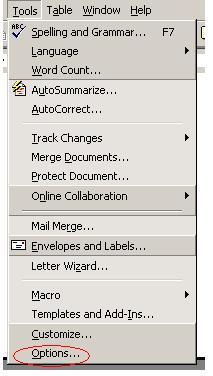
  1. First click on Tools. You can find the tools button in the menubar.Click on tools (circled in red)
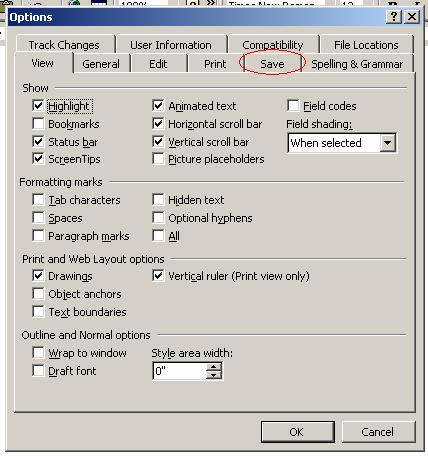
  2. Then click on Options…then click on options (circled in red)
  3. After that click on the Save tabclick on the save tab (circled in red)
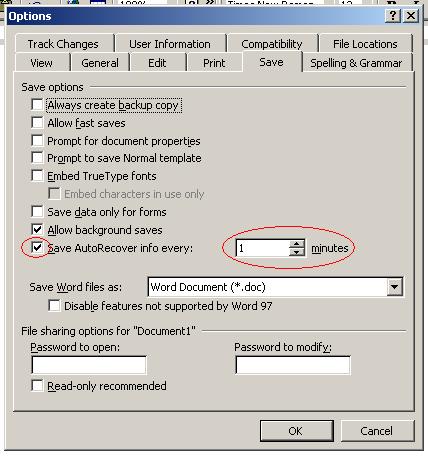
  4. Make sure the check box beside “Save Save AutoRecover info every:” is checked
  5. Then use the tabs beside the number you see to make the number lower (I recommend you set it to one). You can also type in number 1. Note: you cant set it to a number lower than 1 because if you do that the check box will “uncheck itself”make the number 1 and click on okay
  6. Just click on OK and your all set!

There are many more things that you can modify from the options area, so go crazy and have fun!

Sorry about the messed up tutorail and the wierd screenshots. I couldn't do any better at school. That's why I have a better version of this tutorial at my website!

Computers and Internet fAcTs High tech Computing Tips
More blogs about technology.
Email ThisBlogThis!Share to XShare to FacebookShare to Pinterest
Posted in | No comments
Newer Post Older Post Home

0 comments:

Post a Comment

Subscribe to: Post Comments (Atom)

Popular Posts

  • WeTransfer Job Ad
    I like using WeTransfer to transfer things that don't fit in emails, mainly because the site is fast, has a large upload limit (2GB!) an...
  • Contact Me!
    Okay so you want to contact me for something? No Problem! E-Mail You can send all your questions , comments , tips (I need a lot of those)...
  • Adium Update
    Looks like Adium (or Adium X) was updated. Now of course Adium isn't the messenger I use most (I use Trillian + Windows Live Messenger...
  • Todays thoughts
    Great news, now you can get a newer version of the great performancing extension from the mozilla site. This version has many new features,...
  • Fix D-Link Wi-Fi Router Disconnection Problem
    Yes, I have a fairly old D-Link router, and I'm afraid I'm not too happy with it. It keeps disconnecting form time to time, and some...
  • Categories in Beyond Tecknology
    Browse Beyond Tecknology by Categories (arranged alphabetically and highlighted by frequency) adobe apple audio blog blogging cars cellphone...
  • Improving engine life and saving gas by putting your car on neutral at the lights
    You might have read my article about how my friend told me that putting your car on neutral while going downhill saves some gas and my tho...
  • Mail Nation giving you 1083984MB of storage?
    Yes, Mailnation Solutions is giving away 1083984MB or so of storage without any adds for free (and no I do not work for mailnation). This w...
  • A list of things that I'm working on right now...
    Okay, as a tech enthusiast I can't stop working on something that I've started already. Unfortunately, because of school all of thes...
  • Fox it PDF Reader better than Adobe Acrobat Reader?
    Lets face it, PDFs are a part of life. With so many different file formats around, one format that has continued to stay with us is the PDF....

Categories

  • addons
  • adobe
  • ads
  • adsense
  • apple
  • audio
  • blackberry
  • blog
  • blogger
  • blogging
  • cars
  • cellphones
  • clean
  • code
  • comments
  • cricket
  • downloads
  • ebooks
  • email
  • error
  • file sharing
  • firefox
  • fixes
  • free
  • games
  • gas
  • Gmail
  • google
  • hack
  • hotmail
  • installs
  • instant messaging
  • internet
  • internet explorer
  • ipod
  • laptop
  • Linux
  • Live Writer
  • lol
  • Mac
  • mac. mail
  • mail
  • messenger
  • microsoft
  • Microsoft Word
  • money
  • msn
  • music
  • Musings
  • network
  • news
  • online
  • Outlook
  • page
  • peripherals
  • phones
  • photo
  • photoshop
  • php
  • plagiarism
  • problems
  • productivity
  • programming
  • projects
  • rant
  • Registry
  • Review
  • school
  • Screenshots
  • search
  • security
  • software
  • spam
  • speech
  • speed up windows
  • spyware
  • sysfader
  • technology
  • tip
  • tricks
  • tutorials
  • ubuntu
  • updates
  • video
  • virus
  • voip
  • web
  • wi-fi
  • Windows
  • Windows 7
  • Windows Vista
  • Windows XP
  • wireless
  • work
  • wtf
  • youtube

Blog Archive

  • ►  2013 (5)
    • ►  October (2)
    • ►  August (2)
    • ►  March (1)
  • ►  2012 (6)
    • ►  December (1)
    • ►  October (1)
    • ►  June (1)
    • ►  May (1)
    • ►  January (2)
  • ►  2011 (19)
    • ►  October (1)
    • ►  August (1)
    • ►  July (8)
    • ►  June (1)
    • ►  February (4)
    • ►  January (4)
  • ►  2010 (41)
    • ►  November (1)
    • ►  October (3)
    • ►  September (3)
    • ►  August (2)
    • ►  July (12)
    • ►  June (2)
    • ►  May (5)
    • ►  April (3)
    • ►  March (4)
    • ►  February (4)
    • ►  January (2)
  • ►  2009 (59)
    • ►  December (1)
    • ►  November (1)
    • ►  October (1)
    • ►  September (3)
    • ►  August (4)
    • ►  July (4)
    • ►  June (14)
    • ►  May (1)
    • ►  April (3)
    • ►  March (3)
    • ►  February (4)
    • ►  January (20)
  • ►  2008 (108)
    • ►  December (22)
    • ►  November (10)
    • ►  October (14)
    • ►  August (13)
    • ►  July (13)
    • ►  June (6)
    • ►  May (13)
    • ►  April (10)
    • ►  March (5)
    • ►  January (2)
  • ►  2007 (33)
    • ►  December (8)
    • ►  November (1)
    • ►  October (4)
    • ►  September (10)
    • ►  August (1)
    • ►  July (2)
    • ►  June (1)
    • ►  May (2)
    • ►  April (1)
    • ►  February (2)
    • ►  January (1)
  • ►  2006 (137)
    • ►  December (1)
    • ►  November (1)
    • ►  October (1)
    • ►  August (1)
    • ►  July (3)
    • ►  June (9)
    • ►  May (20)
    • ►  April (22)
    • ►  March (33)
    • ►  February (20)
    • ►  January (26)
  • ▼  2005 (55)
    • ►  December (12)
    • ►  November (19)
    • ▼  October (9)
      • Good news!
      • Coming soon. . . . .
      • AutoRecover in Microsoft Word
      • Ten things I didn't know about Microsoft word
      • Search the web tutorials
      • Project still in progress
      • Alienware PC's up to 4.0 GHz!
      • Basics of how computers work
      • How computers are involved in productions
    • ►  September (15)
  • ►  2001 (1)
    • ►  January (1)
Powered by Blogger.

About Me

Unknown
View my complete profile