beyond teck

  • Subscribe to our RSS feed.
  • Twitter
  • StumbleUpon
  • Reddit
  • Facebook
  • Digg

Monday, 4 August 2008

How to check for memory problems with Windows on slow computers

Posted on 09:23 by Unknown

RAM If you’re computer is running really slow off late, Windows might not be the only culprit to blame. Chances are that your hardware is at fault too. In this case clearing junk on your computer, or tweaking your computer settings wont help you. Sometimes, although it is not all too common, your memory can actually fail, causing your computer to seem really slow. Simple things such as dust on the connectors can also impact your memory significantly. However, before you open your computer, here’s how you can use the inbuilt Windows Memory Tool in Windows Vista or other third party software to check for memory problems. Keep in mind though that if you’re not comfortable with checking for such problems yourself, it might be a better idea to take the computer to a trusted local electronic shop to let them check it for you for a small fee, which is of course better than loosing all your data.

Using Windows Vista Memory Diagnostics Tool to Check for Problems

Windows Vista comes with a great tool to help check for memory problems. Of course, as usual, you’ll need admin privileges to continue.
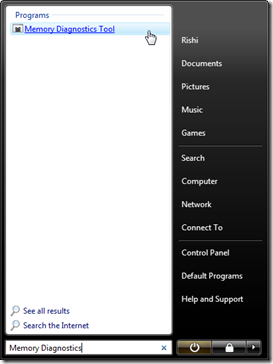
  1. Click Start
  2. Type in Memory Diagnostics in the Start Search box
  3. Click on the Memory Diagnostics Tool Entryimage
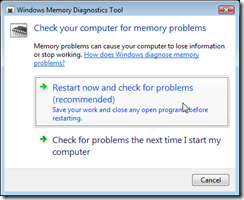
  4. Then in the tool that pops-up click on Restart now and check for memory problems. Unless you’re working on something at the moment, in which case choose the ‘Check for problems the next time I restart my computer option’image
  5. Once you restart windows will automatically perform some memory tests. And when you log in, it’ll show you the results. If it says everything is fine then your computer has no memory problems. However, if it says memory errors, then you’ll have to replace the RAM on your computer.

nomemoryerrors 

In this case shown above (which was the case of my laptop after I replaced the faulty ram DIMM in my laptop) the computer does not have any memory problems, however if this were to show that ‘Memory Errors were Detected’ (like shown below) then it is recommended that you check your memory cards (to remove any dust etc.) of replace them if necessary to prevent system crashes and slow downs.

MemoryProblems

Alternatively, if you use Windows XP, you can take advantage of your manufacturer’s utility partition to perform similar memory tests. Most manufacturers, like Dell, HP, Acer and many more put utility partitions on the hard drive with diagnostic tools to check memory and other hardware problems. So you’ll have to refer to the manual to learn how to use the tools. You can also use a wonderful piece of software called Memtest86, which does much the same tasks. Although I think it is much easier to use the manufacturer’s utility, as it does not involve downloading and burning (as you’ll have to use the CD/Floppy drive to perform memory tests instead of hard drive) anything. Nonetheless, well documented instructions on how to use Memtest can be found on several sites on the Internet.

Email ThisBlogThis!Share to XShare to FacebookShare to Pinterest
Posted in speed up windows, tip, Windows | No comments
Newer Post Older Post Home

0 comments:

Post a Comment

Subscribe to: Post Comments (Atom)

Popular Posts

  • WeTransfer Job Ad
    I like using WeTransfer to transfer things that don't fit in emails, mainly because the site is fast, has a large upload limit (2GB!) an...
  • Contact Me!
    Okay so you want to contact me for something? No Problem! E-Mail You can send all your questions , comments , tips (I need a lot of those)...
  • Adium Update
    Looks like Adium (or Adium X) was updated. Now of course Adium isn't the messenger I use most (I use Trillian + Windows Live Messenger...
  • Todays thoughts
    Great news, now you can get a newer version of the great performancing extension from the mozilla site. This version has many new features,...
  • Fix D-Link Wi-Fi Router Disconnection Problem
    Yes, I have a fairly old D-Link router, and I'm afraid I'm not too happy with it. It keeps disconnecting form time to time, and some...
  • Categories in Beyond Tecknology
    Browse Beyond Tecknology by Categories (arranged alphabetically and highlighted by frequency) adobe apple audio blog blogging cars cellphone...
  • Improving engine life and saving gas by putting your car on neutral at the lights
    You might have read my article about how my friend told me that putting your car on neutral while going downhill saves some gas and my tho...
  • Mail Nation giving you 1083984MB of storage?
    Yes, Mailnation Solutions is giving away 1083984MB or so of storage without any adds for free (and no I do not work for mailnation). This w...
  • A list of things that I'm working on right now...
    Okay, as a tech enthusiast I can't stop working on something that I've started already. Unfortunately, because of school all of thes...
  • The reason why Windows Vista was experiencing problems
    Off late, my Windows Vista Ultimate install was experience a slew of problems, which might explain the reason I had 10 GB of error reporting...

Categories

  • addons
  • adobe
  • ads
  • adsense
  • apple
  • audio
  • blackberry
  • blog
  • blogger
  • blogging
  • cars
  • cellphones
  • clean
  • code
  • comments
  • cricket
  • downloads
  • ebooks
  • email
  • error
  • file sharing
  • firefox
  • fixes
  • free
  • games
  • gas
  • Gmail
  • google
  • hack
  • hotmail
  • installs
  • instant messaging
  • internet
  • internet explorer
  • ipod
  • laptop
  • Linux
  • Live Writer
  • lol
  • Mac
  • mac. mail
  • mail
  • messenger
  • microsoft
  • Microsoft Word
  • money
  • msn
  • music
  • Musings
  • network
  • news
  • online
  • Outlook
  • page
  • peripherals
  • phones
  • photo
  • photoshop
  • php
  • plagiarism
  • problems
  • productivity
  • programming
  • projects
  • rant
  • Registry
  • Review
  • school
  • Screenshots
  • search
  • security
  • software
  • spam
  • speech
  • speed up windows
  • spyware
  • sysfader
  • technology
  • tip
  • tricks
  • tutorials
  • ubuntu
  • updates
  • video
  • virus
  • voip
  • web
  • wi-fi
  • Windows
  • Windows 7
  • Windows Vista
  • Windows XP
  • wireless
  • work
  • wtf
  • youtube

Blog Archive

  • ►  2013 (5)
    • ►  October (2)
    • ►  August (2)
    • ►  March (1)
  • ►  2012 (6)
    • ►  December (1)
    • ►  October (1)
    • ►  June (1)
    • ►  May (1)
    • ►  January (2)
  • ►  2011 (19)
    • ►  October (1)
    • ►  August (1)
    • ►  July (8)
    • ►  June (1)
    • ►  February (4)
    • ►  January (4)
  • ►  2010 (41)
    • ►  November (1)
    • ►  October (3)
    • ►  September (3)
    • ►  August (2)
    • ►  July (12)
    • ►  June (2)
    • ►  May (5)
    • ►  April (3)
    • ►  March (4)
    • ►  February (4)
    • ►  January (2)
  • ►  2009 (59)
    • ►  December (1)
    • ►  November (1)
    • ►  October (1)
    • ►  September (3)
    • ►  August (4)
    • ►  July (4)
    • ►  June (14)
    • ►  May (1)
    • ►  April (3)
    • ►  March (3)
    • ►  February (4)
    • ►  January (20)
  • ▼  2008 (108)
    • ►  December (22)
    • ►  November (10)
    • ►  October (14)
    • ▼  August (13)
      • Wait... They have viruses on the International Spa...
      • This patch package could not be opened error
      • Free and better AppZapper Alternative - Download A...
      • Get Googlebot to crawl and index your site faster
      • Internet Explorer 7 menubar flickering problem
      • OMG! My Gmail account is experiencing errors
      • What is Bootsec.Bak? Can I delete it?
      • Make Firefox on XP look like Firefox on Vista
      • The reason why Windows Vista was experiencing prob...
      • Turbo-charge your productivity with dual computers
      • 5 great add-ons for Internet Explorer 7
      • How to check for memory problems with Windows on s...
      • Why everyone should use disk cleanup on Vista ever...
    • ►  July (13)
    • ►  June (6)
    • ►  May (13)
    • ►  April (10)
    • ►  March (5)
    • ►  January (2)
  • ►  2007 (33)
    • ►  December (8)
    • ►  November (1)
    • ►  October (4)
    • ►  September (10)
    • ►  August (1)
    • ►  July (2)
    • ►  June (1)
    • ►  May (2)
    • ►  April (1)
    • ►  February (2)
    • ►  January (1)
  • ►  2006 (137)
    • ►  December (1)
    • ►  November (1)
    • ►  October (1)
    • ►  August (1)
    • ►  July (3)
    • ►  June (9)
    • ►  May (20)
    • ►  April (22)
    • ►  March (33)
    • ►  February (20)
    • ►  January (26)
  • ►  2005 (55)
    • ►  December (12)
    • ►  November (19)
    • ►  October (9)
    • ►  September (15)
  • ►  2001 (1)
    • ►  January (1)
Powered by Blogger.

About Me

Unknown
View my complete profile