beyond teck

  • Subscribe to our RSS feed.
  • Twitter
  • StumbleUpon
  • Reddit
  • Facebook
  • Digg

Monday, 9 January 2006

Sorry for the inconvenience...

Posted on 22:58 by Unknown
Update: I've temporarily changed the template... the newer template will be coming soon after a while!
Looks like my blog template is a little... ahem wierd in Internet Explorer... so I'm sorry for that. This will be corrected shortly and I assure you that I'll make a simpler template so that you can view this blog without any problems no matter what browser you are using. If you are using browsers like Firefox or the like you should be able to see the site properly.

So if you don't have firefox yet then you might wan't to get it... other pages also look better in Firefox.

Get Firefox!
Read More
Posted in | No comments

Digg, please shed they infinite grace on my humbleblog

Posted on 09:31 by Unknown

I got duggieCool! My post just got on the front page of digg.com... you can take a look at the post at http://www.tech-recipes.com/_tips1135.html...

Update: This is a screenshot of how it looks like now after it has been dugg... nod bad I would say.

Read More
Posted in | No comments

Sunday, 8 January 2006

The difference between presentation styles

Posted on 14:15 by Unknown
Often we see that one mans way of presenting is totally different than the other man's way of presenting something. This article created by Presentation Zen clearly helps you compare and contrast between the different styles of presenting. And a lot depends on this style of presentation... just go on and read the article, it's a great read if you are interested in tech-news!
Read More
Posted in | No comments

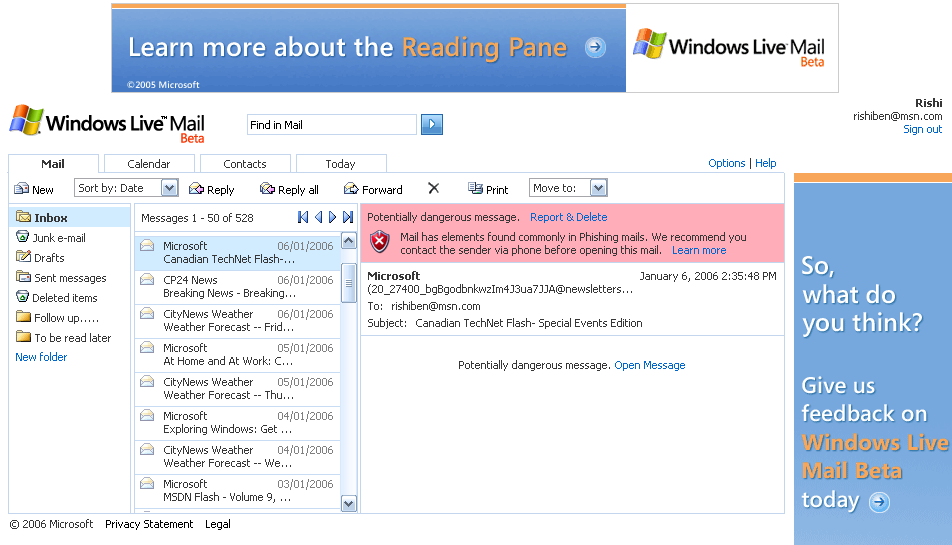
Microsoft's newsletter is considered 'Potentially dangerous'?

Posted on 05:39 by Unknown

Ha, it's funny to know that my Windows Live Mail (beta) thinks that a newsletter from Microsoft is spam... no wait a minute, is Windows Live Mail right?
I haven't laughed for a while now since my system crashed yesterday morning (yes will be writing a post about that later, so that you can prevent your system from crashing.) But then I wondered... why did this happen? Isn't Microsoft smart enough to program it in such a way that it recognizes Microsoft Newsletters are from a trusted source? May be it is...

If you read through what the message in red says about this mail, you are going to see 'Mail has elements found commonly in Phishing mails'. Basically what Windows Live mail is looking for is something called the SenderID. If it fails this, then it is considered as a phishing attempt. However if you compare the address that the newsletter came from and the address from where other newsletters come from it is almost identical! The only thing that is different is the first part of the e-mail address, the part that comes before the '@' sign.

When you take the first part and then compare to other newsletters such as this, the address is catnflash@flsh@microsoft.com... by this we can know that something is seriously fishy here. Or should is say Phishy. And the Sender is Microsoft Canada, not Microsoft.

Is Windows Live Mail Beta right? Or is it wrong? I have a feeling that I'm going to find out soon...

I'm quite sure however, that Microsoft has some problem in their SenderID process, but anyways we'll see...

Technorati Tags: Internet, email, web, phishing

Read More
Posted in | No comments

Wednesday, 4 January 2006

Guess the logo

Posted on 16:59 by Unknown
Hmm, let's play the guess the logo game...

Try and see if you can recognise this logo:


The answer is up in the comments. Good luck! Its easy!
Hint: you can guess what the logo is by its colour
Read More
Posted in | No comments

Tuesday, 3 January 2006

The iPod Shuffle Problem- Part 2

Posted on 18:55 by Unknown
Many people seem to be having iPod Shuffle problems and I guess I'm not the only one and this is also a very useful post if you have iPod problems as well. This post is created for the people who needed help and said so in my previous post. If you haven't read my previous post called 'ipod Shuffle Problems?' then I suggest you read that right now!

Most of you have probably gone through the Apple iPod Support site. If you haven't done that yet then you might as well go through it now. The tips I give below are a mixture of my own tips and what the Apple support site has. You might also want to chat with a Apple Support Agent (24/7), which I higly reccomend... plus the funny thing is that they have this especially for iMac and iPod Shuffle customers. This makes me think, how much problems does the shuffle really have?!

How to solve 'My computer and iTunes don't detect my shuffle, I'm so tired of this thing' Problem:

Reset your iPod shuffle (My way...)


1. Turn over your iPod shuffle (keep it off)
2. Move the switch (the rectangular thing that turns your iPod shuffle on etc) down and wait for 5 seconds. Check if you are getting the green light on the back of your iPod, you will usually get if after 5 seconds.
3. Move it back up to off position wait for 5 secs
4. Then bring it back to on or shuffle position.

I think this way is going to work a little better, here's the original way (what Apple Recommends).

Check if iPodService.exe is running

1. Press Ctrl+Alt+Detele together to bring up Windows Task Manager
2. Go the Processes tab
3. Check if iPodService.exe is running- If it is running then your computer is allright.
4. If it isn't running then read Apple's full article over here...
Check if Safely Remove Hardware icon is there

1. In your system tray you should see a small 'Safely Remove Hardware' icon
2. Double click on it and check if you see iPod anywhere. If you see iPod anywhere this means that your PC is recognising that there is an iPod.

Download the latest iTunes... and make sure that you don't use anything else. If you don't want to use iTunes to put songs into you iPod then you can use other software as well. I'll write up a blog post on that as well.

Make sure you try it with all the USB ports on your computer. For example if your web-cam is using a usb port and has the same requirements of the Shuffle then remove the webcam and put your iPod in that port and check if it works.


How to solve 'The Ipod cannot be updated. An unknown error occurred (-36)' Problem:

Change your iPod shuffle Drive letter (I'm not sure if this helps but I'm putting it in here anyways if you are brave enough to try it out)- Your iPod needs to be plugged in...

1. Click Start
2. Click Control Panel
3. If you are in Classic View Click on Administration Tools
4. If you are in Category View Click on Performance and Maintenance and then on Administration Tools
5. Click Computer Management
6. Click Disk Management
7. Right click on ipod
8. Change the letter to something else

You might also want to read through what Apple has to say about this.
If you've tried all of the above, and are tired of your iPod having problems then make sure that you chat with a Apple Support Agent you can also call 1800-APL-CARE 'iBelieve'. If you bought your iPod shuffle recently and it isn't working and you've tried everything if possible just go and return it and get a better one.

If I haven't covered your problem then please write up a comment, and I'll add that solution to this post as well! Hopefully your iPod is going to work fine!

Please to read the iPod shuffle problems part 1 post as well as the stop the green and orange blinking lights error if that is your problem. You might also want to check out the fix your iPod shuffle post, just in case it might help you out.

Read More
Posted in ipod, problems, tutorials, Windows Vista, Windows XP | No comments

My Shares- Week 3

Posted on 17:10 by Unknown
Here's the stats and my analysis of my shares. Well one thing is for sure, they are doing well, but that's just for now. I'm actually making tons of money with RIM now (I wish I had more RIM shares!), I guess the CES probably helped them, somehow?

Week 3 brought an unexpected twist to the shares. The shares are totally different then what I thought. So why not take a look at them yourself? And if you still didn't take a look at my previous stats then go to this post, the links to the files are there at the bottom of the post!

Excel - 18 KB Image hosted by Photobucket.com
PDF - 59 KB Image hosted by Photobucket.com

Tags: shares, sharemarket


Read More
Posted in | No comments
Newer Posts Older Posts Home
Subscribe to: Posts (Atom)

Popular Posts

  • 5 great add-ons for Internet Explorer 7
    If you haven’t yet upgraded to Internet Explorer 7, I’d say its high time you do so. If you’re still using IE 6, you’re missing out on a lot...
  • WeTransfer Job Ad
    I like using WeTransfer to transfer things that don't fit in emails, mainly because the site is fast, has a large upload limit (2GB!) an...
  • Contact Me!
    Okay so you want to contact me for something? No Problem! E-Mail You can send all your questions , comments , tips (I need a lot of those)...
  • The Nintendo Wii..
    The first thing that comes to my mind is the Wheee! Firefox flick by Jeff Gill. Except this time the IE logo is replaced by the Nintendo Wi...
  • AutoRecover in Microsoft Word
    We all need so save our work all the time, but due to those “system crashes” or those “word errors” it is harder for us to do that. Unlike s...
  • Installing Ubuntu without a CD drive using USB drive
    With the latest release of Ubuntu, I feel that more people will have access to a highly mature, fast and easy to use operating system. But u...
  • How to reduce PDF file sizes on a Mac
    Update : Doesn't seem like this method works well for all files, you may want to try out the link posted in the comments, as this seems ...
  • How we depend on technology in school
    Today I was just finishing up my Geo project and I realized (just like my other 'realization' moments that I've documented in t...
  • Squeet Vs FeedBlitz
    It recently came to my attention that Feedburner has been promoting Squeet on some feeds and FeedBlitz on some. Both basically do the sam...
  • Greate OneNote like Free Notetaking Application - BasKet Note Pads
    I've recently taken up using my laptop as the main source of notes, instead of paper based note systems. As a result, I searching around...

Categories

  • addons
  • adobe
  • ads
  • adsense
  • apple
  • audio
  • blackberry
  • blog
  • blogger
  • blogging
  • cars
  • cellphones
  • clean
  • code
  • comments
  • cricket
  • downloads
  • ebooks
  • email
  • error
  • file sharing
  • firefox
  • fixes
  • free
  • games
  • gas
  • Gmail
  • google
  • hack
  • hotmail
  • installs
  • instant messaging
  • internet
  • internet explorer
  • ipod
  • laptop
  • Linux
  • Live Writer
  • lol
  • Mac
  • mac. mail
  • mail
  • messenger
  • microsoft
  • Microsoft Word
  • money
  • msn
  • music
  • Musings
  • network
  • news
  • online
  • Outlook
  • page
  • peripherals
  • phones
  • photo
  • photoshop
  • php
  • plagiarism
  • problems
  • productivity
  • programming
  • projects
  • rant
  • Registry
  • Review
  • school
  • Screenshots
  • search
  • security
  • software
  • spam
  • speech
  • speed up windows
  • spyware
  • sysfader
  • technology
  • tip
  • tricks
  • tutorials
  • ubuntu
  • updates
  • video
  • virus
  • voip
  • web
  • wi-fi
  • Windows
  • Windows 7
  • Windows Vista
  • Windows XP
  • wireless
  • work
  • wtf
  • youtube

Blog Archive

  • ▼  2013 (5)
    • ▼  October (2)
      • WeTransfer Job Ad
      • iPhone Searching... No Service/No Reception Problem
    • ►  August (2)
    • ►  March (1)
  • ►  2012 (6)
    • ►  December (1)
    • ►  October (1)
    • ►  June (1)
    • ►  May (1)
    • ►  January (2)
  • ►  2011 (19)
    • ►  October (1)
    • ►  August (1)
    • ►  July (8)
    • ►  June (1)
    • ►  February (4)
    • ►  January (4)
  • ►  2010 (41)
    • ►  November (1)
    • ►  October (3)
    • ►  September (3)
    • ►  August (2)
    • ►  July (12)
    • ►  June (2)
    • ►  May (5)
    • ►  April (3)
    • ►  March (4)
    • ►  February (4)
    • ►  January (2)
  • ►  2009 (59)
    • ►  December (1)
    • ►  November (1)
    • ►  October (1)
    • ►  September (3)
    • ►  August (4)
    • ►  July (4)
    • ►  June (14)
    • ►  May (1)
    • ►  April (3)
    • ►  March (3)
    • ►  February (4)
    • ►  January (20)
  • ►  2008 (108)
    • ►  December (22)
    • ►  November (10)
    • ►  October (14)
    • ►  August (13)
    • ►  July (13)
    • ►  June (6)
    • ►  May (13)
    • ►  April (10)
    • ►  March (5)
    • ►  January (2)
  • ►  2007 (33)
    • ►  December (8)
    • ►  November (1)
    • ►  October (4)
    • ►  September (10)
    • ►  August (1)
    • ►  July (2)
    • ►  June (1)
    • ►  May (2)
    • ►  April (1)
    • ►  February (2)
    • ►  January (1)
  • ►  2006 (137)
    • ►  December (1)
    • ►  November (1)
    • ►  October (1)
    • ►  August (1)
    • ►  July (3)
    • ►  June (9)
    • ►  May (20)
    • ►  April (22)
    • ►  March (33)
    • ►  February (20)
    • ►  January (26)
  • ►  2005 (55)
    • ►  December (12)
    • ►  November (19)
    • ►  October (9)
    • ►  September (15)
  • ►  2001 (1)
    • ►  January (1)
Powered by Blogger.

About Me

Unknown
View my complete profile