beyond teck

  • Subscribe to our RSS feed.
  • Twitter
  • StumbleUpon
  • Reddit
  • Facebook
  • Digg

Wednesday, 31 May 2006

How we depend on technology in school

Posted on 06:05 by Unknown
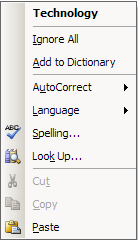
Today I was just finishing up my Geo project and I realized (just like my other 'realization' moments that I've documented in this blog) that we depend so much on computers these days that it actually makes us less intelligent. For example, instead of checking and knowing the spelling the word and using dictionaries when doing projects we can just us a spell checker in a word processing program. Although this makes is more convenient for us, we don't look at the correct spelling of the word all we do is right click on the word and select the spelling that looks correct to us, without even bothering to learn the spelling.

After I thought about it it seemed to me that people are getting carried away by technology and that's why we are loosing our normal intelligence that we always had. It's not a bad thing, because I'm quite certain that things like computers are always going to be with us (although nothing is for granted) but it's not a great thing too.

I know for sure that soon after I finished this blog post and finished my homework, I'm definitely going to start writing things out the 'old school' way instead of just typing things out and handing them in. I believe that this way, I won't loose touch of technology and at the same time I won't forget how to use the dictionary and write as well.
Read More
Posted in | No comments

Tuesday, 30 May 2006

It's getting hot in here

Posted on 00:53 by Unknown
Literally! It's kind of a good thing and a bad thing when you come to think of it. I mean, first of all us Canadians have to face about (and no we don't pronounce it as a-boot) 6 months of winter, freezing, cold and chilly. Then we get about 3 months of summer, when it gets pretty hot, but the only problem is sometimes it gets too hot to tolerate (does that make any sense?) so we need to rely on AC's etc.

Oh well, atleast the good thing about summer is.... school's out for summer! And in about 3 weeks I can enjoy what summer has to offer. But before that I must go through the following:

  1. 6 big projects (that I need to do all by my self... including work of others in my group like I mentioned over here).
  2. 5 Exams- That are worth a lot
  3. Learn more stuff because the teachers aren't apparently finished the whole curriculum
  4. Homework- We still aren't exempt from getting homework I guess
  5. Practice Exams and tests- We need to go through the usual review, practice tests and exams.
Phew... it'll be a great relief after all that stuff is done.
Read More
Posted in | No comments

Sunday, 28 May 2006

Make Microsoft Windows XP Passwords more secure

Posted on 14:14 by Unknown
We all know that Microsoft sometimes has problems in their operating systems. Sometimes they just don't do somethings correctly (like the WMF exploit that we all know about) and it's up to us to tweak our computer to make it correct. That's why today I'm going to talk a little bit about the security of Windows XP because we all care about it.

Now, you might not know this so let's start from the basics. All windows user passwords are stored as hashes... which simply mean that they are encrypted to protect it. But windows uses something called LMhash to store the passwords. Which is not good news if you want to keep your data secure. Here's how you can fix this.

Prevent your Windows PC from getting hacked

Basically what LMhash (or Lan Manager hash) does is converts the password to upper case, makes it 14 characters long, splits the 'encrypted password' into 7 pairs etc. So it sort or puts it into the same format every single time, and since hackers know this format it just makes it easier to crack because its not totally different every time. You can read more about it from Microsoft, the geniuses who created this in the first place.

So what you want to to is stop using the LMhash to convert the passwords to make it more easily accessible. And this is very simple to do using the registry. All you do is enable the noLMhash value and Windows will stop using LMhash... simple.

Here's how you do it:
  • Make sure you have admin privileges before you continue
  • Make sure that you back up the registry before you perform this tweak
  1. Click 'Start'
  2. Click 'Run'
  3. Type in 'regedit' (without the quotes of course).
  4. Then navigate to the following registry key using the left column : HKEY_LOCAL_MACHINE\SYSTEM\CurrentControlSet\Control\Lsa
  5. In the right column Double click on nolmhash
  6. In the box that pop's up type in 1 and click 'OK'
  7. Click regedit and the reboot your computer.
  8. Important: Change Your Password! Or else the old hash is still going to remain there and the tweak won't do you any good. And make sure that you keep changing your password at regular intervals.
Congratulations, your passwords are now going to be more secure and less crackable, however you still need to take more precautions so that you don't loose any important data. I'm sure when I have more time I'm going to write up more articles on how to do this, so make sure you subscribe so that you don't miss a beat.
Read More
Posted in hack, tip, Windows | No comments

Friday, 26 May 2006

Blank email messages in Microsoft Outlook 2007

Posted on 14:15 by Unknown
If you're having problems with seeing text in Microsoft Outlook 2007 beta and can't see the body of the e-mail message or can't see the text, then I might have the solution for you!

I too had the same problem where I could not read my e-mail messages, why? Because of AVG Anti-Virus's E-mail Scanner. That's why all you need to do to be able to view your future e-mail messages that you get is disable certifying AVG's Email Scanner. If you have any other anti virus, then you should refer to the help file that came with it or check on the manufacturer's website on how to stop the anti virus from putting the footer that says it's checked the e-mails. I you are able to fix the problem then please leave a comment on how you did so.

This means that you won't be seeing the Message 'No threat found by AVG at the end of the message'. However AVG will still check for threats.

  1. Open up AVG Control Center by right clicking the AVG icon in your sys tray and selecting Launch Control Center.
  2. Double click on E-mail Scanner. (you can also click on E-mail scanner then click on properties)
  3. Click on button that says 'Configure'.
  4. Uncheck both the 'Certify Mail' check boxes under 'Email Scanning'.
  5. Click on 'OK' twice on both the screens
  6. Restart Microsoft Outlook 2007.
Now you should be able to see all the messages without a problem. However.. I'm afraid that the e-mails that outlook has already downloaded need to be downloaded again for you to view them properly. So if you have a lot of blank messages, you will have to download them again.

Why this works is probably because of the changes in outlook. When AVG (or perhaps any other Antivirus) tries to certify the e-mail messages, it probably tries to edit the code. Doing that then corrupts the code in the e-mail message (even if it is plain text) therefore causing Outlook to display a blank e-mail. So if you direct AVG to not edit the e-mail, just scan through it you shouldn't have any problems in reading it (hopefully). I'm sure that other Anti-Viruses also have the same problem, so you must direct them not to put in the certification footer and you should be able to download e-mail properly until Microsoft fixes the problem.
Read More
Posted in | No comments

Tuesday, 23 May 2006

Microsoft doesn't mind piracy

Posted on 06:09 by Unknown
Interestingly enough Microsoft doesn't care that much about piracy even though they might be loosing out on millions of dollars because of it. Besides, how can they possible stop it anyway? I think what Microsoft is doing here is a intelligent move, because I'd rather be writing better code than trying to make sure that it only works for legit users. How else can the company progress?

And they'll also be giving all the important security updates for the users of counterfiet software. I guess they are really realizing that if their software is good nothing can stop the piracy, because they is always a way to illegally get serial numbers and hacks and cracks.

I for one don't think piracy is a good idea as well, because as a programmer I realize how much hard work goes into making a piece of code actually work and the planning and getting rid of bugs, and they need to get paid too. Besides with so much open source software, I don't think I'll ever be pirating software... ever! I'd rather use Linux and Open Office and use Thunderbird for my e-mail as opposed to Windows Vista and Microsoft Office 2007 and using Outlook for e-mail.

Read More
Posted in | No comments

Sunday, 21 May 2006

Dude, Where's the tech help?

Posted on 07:31 by Unknown
Right now I'm very busy with a lots of things such as tech help and so on. However if you do need help here are some things that are definately going to help you out. I'll be back with cool posts on how to optimize stuff and so on, however right now I just don't seem to have enough time. So here are some resources which you can use.

Windows Related Problems
  • MSnews- Microsoft has done a great job of building a great tech support community, so if you have any help then I recommend that you join the following newsgroup. If you are using Windows XP then make sure you join: microsoft.public.windowsxp.general newsgroup and the microsoft.public.windowsxp.help_and_support. If you need more help on how to use newsgroups take a look at this KB article.
  • How to make good posts- If you have a problem then make sure you read this post so that you can ask your question properly and get helped incase you seem to need some help.
Other Computer Related Problems
  • Tech-Recipes- Has lots of articles and a forum that is guaranteed to be very helpful.
  • Syschat- The place to go where you are assured to get a reply, and get your problem solved.
Apple Related problems
  • Apple Support- You will most likely find all the necessary articles over here and make sure to also take a look at the discussions section.
Sorry if I don't reply to any of your e-mail or comments, I'll make sure to do that as soon as I have time, and put up a support section on this site as well.
Read More
Posted in | No comments

Saturday, 20 May 2006

How to fix your iPod Shuffle

Posted on 07:03 by Unknown
The tips listed below were provided by Stephen Grandy (thanks!) in the comments section of the iPod shuffle problems part 2 post. Since this tip seems to be very useful, I advise you all you give it a try and try to get rid of the problem where iTunes or your computer does not recognize the shuffle.

Here are the instructions given below:
I have found a lot of problems with the IPOD Shuffle. The best way is to not charge it via the computer and get a cheap USB Adapter. That is the first thing to do.

The second part is if you have any problems with your IPOD then
open it as a hard drive in windows, providing it is detected. Delete the IPOD Control Directory.

Now you need to get the following file: http://shuffle-db.sourceforge.net/
it may be in zip format so make sure you know about this. You may also need Python Programming Language that is free. Copy the program to your shuffle. Now copy the files over as you would any hard drive mp3 etc drag and drop and run this nifty program it will rebuild the database.

Put your shuffle in and itunes will see it as a new shuffle and ask what you want to name it etc. Name it whatever you want and then you will go your IPOD Control Directory Back. Now simply run rebuild and it will rebuild the files database.

Your iPOD Shuffle should now work.

PS: This is the only method I have known to work. I have tried all other kinds of Methods and they have resulted in nothing.

If you want to spend cash then a nice program is Anipod. But if you don't want to fork out over 20 dollars then my Method works and works well.

Steve
Thanks Steve! I'm sure this is going to help many out there who don't know in which direction to go. However I must warn users that this might void your warranty therefore, please use only if your support period is over etc.

You might also want to take a look at iPod shuffle problems part 1 and part 2 as well as unplug your ipod properly and stop the orange/green lights posts, how to use iPod and iTunes post or other posts that are mentioned. Sadly, there are so many things you can do to fix your iPod =( !
Read More
Posted in ipod, problems, tutorials, Windows Vista, Windows XP | No comments
Newer Posts Older Posts Home
Subscribe to: Posts (Atom)

Popular Posts

  • 5 great add-ons for Internet Explorer 7
    If you haven’t yet upgraded to Internet Explorer 7, I’d say its high time you do so. If you’re still using IE 6, you’re missing out on a lot...
  • WeTransfer Job Ad
    I like using WeTransfer to transfer things that don't fit in emails, mainly because the site is fast, has a large upload limit (2GB!) an...
  • Contact Me!
    Okay so you want to contact me for something? No Problem! E-Mail You can send all your questions , comments , tips (I need a lot of those)...
  • The Nintendo Wii..
    The first thing that comes to my mind is the Wheee! Firefox flick by Jeff Gill. Except this time the IE logo is replaced by the Nintendo Wi...
  • Installing Ubuntu without a CD drive using USB drive
    With the latest release of Ubuntu, I feel that more people will have access to a highly mature, fast and easy to use operating system. But u...
  • Using Speech Recognition in Windows 7
    If there’s one area where Windows is way ahead of every other operating system in the world, it has to be Speech Recognition. There is no ot...
  • AutoRecover in Microsoft Word
    We all need so save our work all the time, but due to those “system crashes” or those “word errors” it is harder for us to do that. Unlike s...
  • Dowload Free Toast Titanium alternative for Mac
    Sometimes paying for software just isn't an option. But thankfully, there are a lot of free and open source alternatives around that you...
  • Sending Scheduled Emails through Apple Mail
    One nice feature missing in most email providers' web interfaces is the ability to schedule your email and send it at a later time. Unfo...
  • How to reduce PDF file sizes on a Mac
    Update : Doesn't seem like this method works well for all files, you may want to try out the link posted in the comments, as this seems ...

Categories

  • addons
  • adobe
  • ads
  • adsense
  • apple
  • audio
  • blackberry
  • blog
  • blogger
  • blogging
  • cars
  • cellphones
  • clean
  • code
  • comments
  • cricket
  • downloads
  • ebooks
  • email
  • error
  • file sharing
  • firefox
  • fixes
  • free
  • games
  • gas
  • Gmail
  • google
  • hack
  • hotmail
  • installs
  • instant messaging
  • internet
  • internet explorer
  • ipod
  • laptop
  • Linux
  • Live Writer
  • lol
  • Mac
  • mac. mail
  • mail
  • messenger
  • microsoft
  • Microsoft Word
  • money
  • msn
  • music
  • Musings
  • network
  • news
  • online
  • Outlook
  • page
  • peripherals
  • phones
  • photo
  • photoshop
  • php
  • plagiarism
  • problems
  • productivity
  • programming
  • projects
  • rant
  • Registry
  • Review
  • school
  • Screenshots
  • search
  • security
  • software
  • spam
  • speech
  • speed up windows
  • spyware
  • sysfader
  • technology
  • tip
  • tricks
  • tutorials
  • ubuntu
  • updates
  • video
  • virus
  • voip
  • web
  • wi-fi
  • Windows
  • Windows 7
  • Windows Vista
  • Windows XP
  • wireless
  • work
  • wtf
  • youtube

Blog Archive

  • ▼  2013 (5)
    • ▼  October (2)
      • WeTransfer Job Ad
      • iPhone Searching... No Service/No Reception Problem
    • ►  August (2)
    • ►  March (1)
  • ►  2012 (6)
    • ►  December (1)
    • ►  October (1)
    • ►  June (1)
    • ►  May (1)
    • ►  January (2)
  • ►  2011 (19)
    • ►  October (1)
    • ►  August (1)
    • ►  July (8)
    • ►  June (1)
    • ►  February (4)
    • ►  January (4)
  • ►  2010 (41)
    • ►  November (1)
    • ►  October (3)
    • ►  September (3)
    • ►  August (2)
    • ►  July (12)
    • ►  June (2)
    • ►  May (5)
    • ►  April (3)
    • ►  March (4)
    • ►  February (4)
    • ►  January (2)
  • ►  2009 (59)
    • ►  December (1)
    • ►  November (1)
    • ►  October (1)
    • ►  September (3)
    • ►  August (4)
    • ►  July (4)
    • ►  June (14)
    • ►  May (1)
    • ►  April (3)
    • ►  March (3)
    • ►  February (4)
    • ►  January (20)
  • ►  2008 (108)
    • ►  December (22)
    • ►  November (10)
    • ►  October (14)
    • ►  August (13)
    • ►  July (13)
    • ►  June (6)
    • ►  May (13)
    • ►  April (10)
    • ►  March (5)
    • ►  January (2)
  • ►  2007 (33)
    • ►  December (8)
    • ►  November (1)
    • ►  October (4)
    • ►  September (10)
    • ►  August (1)
    • ►  July (2)
    • ►  June (1)
    • ►  May (2)
    • ►  April (1)
    • ►  February (2)
    • ►  January (1)
  • ►  2006 (137)
    • ►  December (1)
    • ►  November (1)
    • ►  October (1)
    • ►  August (1)
    • ►  July (3)
    • ►  June (9)
    • ►  May (20)
    • ►  April (22)
    • ►  March (33)
    • ►  February (20)
    • ►  January (26)
  • ►  2005 (55)
    • ►  December (12)
    • ►  November (19)
    • ►  October (9)
    • ►  September (15)
  • ►  2001 (1)
    • ►  January (1)
Powered by Blogger.

About Me

Unknown
View my complete profile