beyond teck

  • Subscribe to our RSS feed.
  • Twitter
  • StumbleUpon
  • Reddit
  • Facebook
  • Digg

Thursday, 2 March 2006

Hex Colour Codes and Colour

Posted on 07:38 by Unknown
As we all know that hexadecimal codes are used to create colours that we see on the monitor and are used widely be web developers all over the world. Now we know how to create numbers with hex codes, but here's how you can create colour codes (well basic colour codes anyways).

Monitors use RGB format, which stands for red, green and blue. There are the primary colours that are used to make light, when these lights come together they create the colour that is supposed to get created. So the hex colour codes tell how these lights need to behave (in html and photo editing). So let's take this step by step:

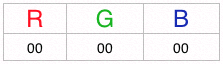
1. Imagine there are three columns with Red Green And Blue.

2. In each column there are two digits, you cannot have one digit only two digits. Why? Because there are only 255 combinations of each colour (255 is the same as 16x15 + 1x15) which means that you can only have 2 spaces, which put together give millions of combinations.
For example:

3. Since f=15 and, if any value is f that is f should be on. For example: If I want the colour to be blue, I will have f under the blue column, and since you can put 2 digits you can put 2 f's in there so that the pixel becomes completely blue!
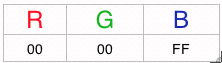
4. If you want any pixel to be turned off, the numbers that you put under the column should be 00 (0's have no value, which tells the pixel that it should not use that colour)
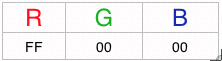
For example: The picture shows that only red is being used (because it has the highest value of 255, and the others aren't being used because it is a 0.
5. When the quantities of these colurs are mixed together you get different light (for example if all of them are on, the colour we see would be white, and if all of them are off the colour we see would be black)
Hex colour codes are basically all the numbers under all of the three colums above (RGB) put together. So the hex code for green would be : 00ff00 (look at the picture below to help you understand)

Then all you do is use these colour codes using the following tags "(font color=######) and type in youre text inbetween and then when you don't want the colour any more just end it with (/font). Note: You NEED to replace the '(' brackets with '<' brackets for it work. And put in the hex code where it says '######'!

These days nobody uses their brain to think of hex color codes because they are done for you by a lot of programs (such as Adobe Photoshop) that you can find easily. However I still think it is interesting to know how cool the computer codes are, so it's don't consider this post a waste of your time... any gaining knowledge is not wasting time!
Email ThisBlogThis!Share to XShare to FacebookShare to Pinterest
Posted in | No comments
Newer Post Older Post Home

0 comments:

Post a Comment

Subscribe to: Post Comments (Atom)

Popular Posts

  • WeTransfer Job Ad
    I like using WeTransfer to transfer things that don't fit in emails, mainly because the site is fast, has a large upload limit (2GB!) an...
  • Contact Me!
    Okay so you want to contact me for something? No Problem! E-Mail You can send all your questions , comments , tips (I need a lot of those)...
  • Adium Update
    Looks like Adium (or Adium X) was updated. Now of course Adium isn't the messenger I use most (I use Trillian + Windows Live Messenger...
  • Todays thoughts
    Great news, now you can get a newer version of the great performancing extension from the mozilla site. This version has many new features,...
  • Fix D-Link Wi-Fi Router Disconnection Problem
    Yes, I have a fairly old D-Link router, and I'm afraid I'm not too happy with it. It keeps disconnecting form time to time, and some...
  • Categories in Beyond Tecknology
    Browse Beyond Tecknology by Categories (arranged alphabetically and highlighted by frequency) adobe apple audio blog blogging cars cellphone...
  • Improving engine life and saving gas by putting your car on neutral at the lights
    You might have read my article about how my friend told me that putting your car on neutral while going downhill saves some gas and my tho...
  • Mail Nation giving you 1083984MB of storage?
    Yes, Mailnation Solutions is giving away 1083984MB or so of storage without any adds for free (and no I do not work for mailnation). This w...
  • A list of things that I'm working on right now...
    Okay, as a tech enthusiast I can't stop working on something that I've started already. Unfortunately, because of school all of thes...
  • Fox it PDF Reader better than Adobe Acrobat Reader?
    Lets face it, PDFs are a part of life. With so many different file formats around, one format that has continued to stay with us is the PDF....

Categories

  • addons
  • adobe
  • ads
  • adsense
  • apple
  • audio
  • blackberry
  • blog
  • blogger
  • blogging
  • cars
  • cellphones
  • clean
  • code
  • comments
  • cricket
  • downloads
  • ebooks
  • email
  • error
  • file sharing
  • firefox
  • fixes
  • free
  • games
  • gas
  • Gmail
  • google
  • hack
  • hotmail
  • installs
  • instant messaging
  • internet
  • internet explorer
  • ipod
  • laptop
  • Linux
  • Live Writer
  • lol
  • Mac
  • mac. mail
  • mail
  • messenger
  • microsoft
  • Microsoft Word
  • money
  • msn
  • music
  • Musings
  • network
  • news
  • online
  • Outlook
  • page
  • peripherals
  • phones
  • photo
  • photoshop
  • php
  • plagiarism
  • problems
  • productivity
  • programming
  • projects
  • rant
  • Registry
  • Review
  • school
  • Screenshots
  • search
  • security
  • software
  • spam
  • speech
  • speed up windows
  • spyware
  • sysfader
  • technology
  • tip
  • tricks
  • tutorials
  • ubuntu
  • updates
  • video
  • virus
  • voip
  • web
  • wi-fi
  • Windows
  • Windows 7
  • Windows Vista
  • Windows XP
  • wireless
  • work
  • wtf
  • youtube

Blog Archive

  • ►  2013 (5)
    • ►  October (2)
    • ►  August (2)
    • ►  March (1)
  • ►  2012 (6)
    • ►  December (1)
    • ►  October (1)
    • ►  June (1)
    • ►  May (1)
    • ►  January (2)
  • ►  2011 (19)
    • ►  October (1)
    • ►  August (1)
    • ►  July (8)
    • ►  June (1)
    • ►  February (4)
    • ►  January (4)
  • ►  2010 (41)
    • ►  November (1)
    • ►  October (3)
    • ►  September (3)
    • ►  August (2)
    • ►  July (12)
    • ►  June (2)
    • ►  May (5)
    • ►  April (3)
    • ►  March (4)
    • ►  February (4)
    • ►  January (2)
  • ►  2009 (59)
    • ►  December (1)
    • ►  November (1)
    • ►  October (1)
    • ►  September (3)
    • ►  August (4)
    • ►  July (4)
    • ►  June (14)
    • ►  May (1)
    • ►  April (3)
    • ►  March (3)
    • ►  February (4)
    • ►  January (20)
  • ►  2008 (108)
    • ►  December (22)
    • ►  November (10)
    • ►  October (14)
    • ►  August (13)
    • ►  July (13)
    • ►  June (6)
    • ►  May (13)
    • ►  April (10)
    • ►  March (5)
    • ►  January (2)
  • ►  2007 (33)
    • ►  December (8)
    • ►  November (1)
    • ►  October (4)
    • ►  September (10)
    • ►  August (1)
    • ►  July (2)
    • ►  June (1)
    • ►  May (2)
    • ►  April (1)
    • ►  February (2)
    • ►  January (1)
  • ▼  2006 (137)
    • ►  December (1)
    • ►  November (1)
    • ►  October (1)
    • ►  August (1)
    • ►  July (3)
    • ►  June (9)
    • ►  May (20)
    • ►  April (22)
    • ▼  March (33)
      • Firefox tip: Saving Sessions
      • The atom error starts again
      • Lifehacker gets duped
      • List of Downloads
      • Beyond Tecknology Sage Style
      • Interesting stuff of the day
      • The different file formats
      • Firefox Quick Tip: Disable Java
      • Smaller font
      • IE 7 is good
      • Almost done widgets
      • Using the Find tool in Firefox
      • Does my site need more pics?
      • How to: Lower the size of pics
      • Simplifying posts
      • Moving to Miramar
      • New Feature: Email this post
      • Blogger is down
      • Behold My Latest Creation
      • AJAX here I come
      • Can this blog be Ajaxified?
      • Cleaning up the code!
      • Google hires 15 year old
      • How to: Enhance your photographs
      • Exploring Photoshop
      • T.O. to become wireless hotspot
      • Windows XP boots on a Macbook Pro
      • What happens in Digital Imaging
      • RIM and NTP dispute ends
      • Converting numbers to hexadecimal
      • Hex Colour Codes and Colour
      • Laptops are a requirement at a few Universities
      • Hexadecimal Colour Codes
    • ►  February (20)
    • ►  January (26)
  • ►  2005 (55)
    • ►  December (12)
    • ►  November (19)
    • ►  October (9)
    • ►  September (15)
  • ►  2001 (1)
    • ►  January (1)
Powered by Blogger.

About Me

Unknown
View my complete profile