beyond teck

  • Subscribe to our RSS feed.
  • Twitter
  • StumbleUpon
  • Reddit
  • Facebook
  • Digg

Monday, 1 December 2008

Microsoft’s Phishing Filter?

Posted on 17:25 by Unknown

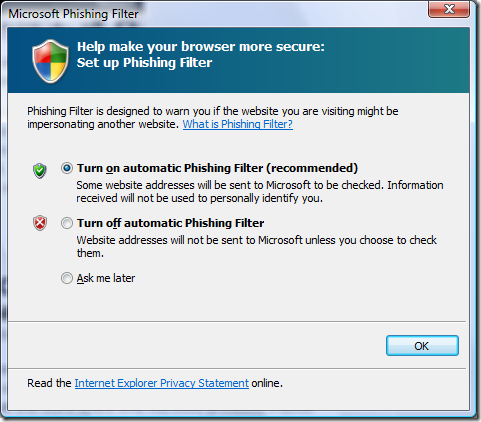
What is Microsoft’s Phishing filter, and why does it keep popping-up at the most random of times?

Well… the first question, I can answer. But for the second part – I have no idea.
image

As you can see from the screenshot above, the message is about Microsoft’s Phishing Filter. However I already set the settings for the phishing filter when I first started Internet Explorer, why is IE asking me the same question again? Does that mean that the phishing filter wasn’t on even when I told IE to turn it on the first time? Honestly, I don’t know.

However, after some “fishing” around, I have gathered this information:

As an aside, I have no clue what the screenshot below is all about, rather interesting don’t you think?

image

Anyway, What is the Phishing Filter?

Well, pretty much what phishing means is trying to ‘fish’ for information illegally. For example, if I create a website that is going to fraudulently make you give me your credit card number/password or other sensitive information, then that website is ‘phishing’ for your information. But the problem is, that these websites look so much like the real website, that its hard to figure out if its the real website or a phishing website. Plus, you might receive an e-mail from a person that you already know asking you to go to this website, making it look even more legitimate.

How can the Phishing Filter Help me?

What Phishing Filter does is lets you know when you are about to go a Phishing website, before you actually go to a website. It kind of acts like a shield, that protect you from identity thieves that want your information. Plus, all you need to do is allow it to check the website that you are visiting with a database, and the filter will do the rest. So its always a good thing to keep the filter on.

How do I Turn on the Phishing Filter?

Good question. Simply press Alt to reveal the menubar. Then go to Tools > Phishing Filter > Turn On Website Checking and viola.

image

What about unsafe websites, does the Phishing Filter help me from that?

As far as I’ve figured out, the phishing filter doesn’t really protect you from a really malicious website. Nor does any other kind of software out there. There are pieces of software that come close, like McAfee site advisor and Open DNS (read my article on Malicious Website here) that help you steer clear of bad sites on the internet, but none of these solutions are highly effective. Why? Because the internet is constantly changing, and if someone uploads a malicious site right this instant, chances are that Site Advisor or Open DNS don’t know about it yet. So the best way to protect yourself is always to exercise caution. A little common sense can help sometimes.

Would someone really ask you to type your credit card number so that they can ‘verify’ its really you and not delete your account. Nope. So sometimes, just knowing about certain things help. Nevertheless, using Site Advisor and Open DNS is a good idea – just incase.

Email ThisBlogThis!Share to XShare to FacebookShare to Pinterest
Posted in | No comments
Newer Post Older Post Home

0 comments:

Post a Comment

Subscribe to: Post Comments (Atom)

Popular Posts

  • Contact Me!
    Okay so you want to contact me for something? No Problem! E-Mail You can send all your questions , comments , tips (I need a lot of those)...
  • WeTransfer Job Ad
    I like using WeTransfer to transfer things that don't fit in emails, mainly because the site is fast, has a large upload limit (2GB!) an...
  • Adium Update
    Looks like Adium (or Adium X) was updated. Now of course Adium isn't the messenger I use most (I use Trillian + Windows Live Messenger...
  • Todays thoughts
    Great news, now you can get a newer version of the great performancing extension from the mozilla site. This version has many new features,...
  • Categories in Beyond Tecknology
    Browse Beyond Tecknology by Categories (arranged alphabetically and highlighted by frequency) adobe apple audio blog blogging cars cellphone...
  • The reason why Windows Vista was experiencing problems
    Off late, my Windows Vista Ultimate install was experience a slew of problems, which might explain the reason I had 10 GB of error reporting...
  • Mail Nation giving you 1083984MB of storage?
    Yes, Mailnation Solutions is giving away 1083984MB or so of storage without any adds for free (and no I do not work for mailnation). This w...
  • A list of things that I'm working on right now...
    Okay, as a tech enthusiast I can't stop working on something that I've started already. Unfortunately, because of school all of thes...
  • Fix D-Link Wi-Fi Router Disconnection Problem
    Yes, I have a fairly old D-Link router, and I'm afraid I'm not too happy with it. It keeps disconnecting form time to time, and some...
  • How to get inspired by a website
    That's right, some videos out there are truly inspirational. I wonder how many people know about this already, but I for one have been c...

Categories

  • addons
  • adobe
  • ads
  • adsense
  • apple
  • audio
  • blackberry
  • blog
  • blogger
  • blogging
  • cars
  • cellphones
  • clean
  • code
  • comments
  • cricket
  • downloads
  • ebooks
  • email
  • error
  • file sharing
  • firefox
  • fixes
  • free
  • games
  • gas
  • Gmail
  • google
  • hack
  • hotmail
  • installs
  • instant messaging
  • internet
  • internet explorer
  • ipod
  • laptop
  • Linux
  • Live Writer
  • lol
  • Mac
  • mac. mail
  • mail
  • messenger
  • microsoft
  • Microsoft Word
  • money
  • msn
  • music
  • Musings
  • network
  • news
  • online
  • Outlook
  • page
  • peripherals
  • phones
  • photo
  • photoshop
  • php
  • plagiarism
  • problems
  • productivity
  • programming
  • projects
  • rant
  • Registry
  • Review
  • school
  • Screenshots
  • search
  • security
  • software
  • spam
  • speech
  • speed up windows
  • spyware
  • sysfader
  • technology
  • tip
  • tricks
  • tutorials
  • ubuntu
  • updates
  • video
  • virus
  • voip
  • web
  • wi-fi
  • Windows
  • Windows 7
  • Windows Vista
  • Windows XP
  • wireless
  • work
  • wtf
  • youtube

Blog Archive

  • ►  2013 (5)
    • ►  October (2)
    • ►  August (2)
    • ►  March (1)
  • ►  2012 (6)
    • ►  December (1)
    • ►  October (1)
    • ►  June (1)
    • ►  May (1)
    • ►  January (2)
  • ►  2011 (19)
    • ►  October (1)
    • ►  August (1)
    • ►  July (8)
    • ►  June (1)
    • ►  February (4)
    • ►  January (4)
  • ►  2010 (41)
    • ►  November (1)
    • ►  October (3)
    • ►  September (3)
    • ►  August (2)
    • ►  July (12)
    • ►  June (2)
    • ►  May (5)
    • ►  April (3)
    • ►  March (4)
    • ►  February (4)
    • ►  January (2)
  • ►  2009 (59)
    • ►  December (1)
    • ►  November (1)
    • ►  October (1)
    • ►  September (3)
    • ►  August (4)
    • ►  July (4)
    • ►  June (14)
    • ►  May (1)
    • ►  April (3)
    • ►  March (3)
    • ►  February (4)
    • ►  January (20)
  • ▼  2008 (108)
    • ▼  December (22)
      • Using OpenOffice Writer as my Blogging Application
      • Merry Christmas, Happy Hanukah, Happy Kwanzaa and ...
      • List of Websites for FREE math help, practice and ...
      • Download the Photoshop CS4 alternatives for free!
      • Download Free Adobe Illustrator CS3 and CS4 Altern...
      • The real way to clean up your Windows registry and...
      • Backing up and restoring your Windows Registry
      • Backing up and Downloading your PicasaWeb Pictures
      • A new easier way to back up your Blogger Blog
      • Use Active Screen Corners for increasing productiv...
      • Installing and uninstalling fonts on a Mac
      • Excellent sites for free Windows and Mac fonts
      • Installing and removing Fonts on Windows
      • How to 'steal' custom emoticons in MSN Messenger
      • How long does it take you to put up a post?
      • Use a free online virus scanner that won’t slow yo...
      • Internet Explorer Crashes All the Time
      • Boost Productivity by opening applications faster ...
      • Cool yet helpful tricks on Windows XP or Vista
      • Microsoft’s Phishing Filter?
      • Protect yourself from Malicious Websites for free
      • 5 steps make Windows XP faster in 2 mins FREE!
    • ►  November (10)
    • ►  October (14)
    • ►  August (13)
    • ►  July (13)
    • ►  June (6)
    • ►  May (13)
    • ►  April (10)
    • ►  March (5)
    • ►  January (2)
  • ►  2007 (33)
    • ►  December (8)
    • ►  November (1)
    • ►  October (4)
    • ►  September (10)
    • ►  August (1)
    • ►  July (2)
    • ►  June (1)
    • ►  May (2)
    • ►  April (1)
    • ►  February (2)
    • ►  January (1)
  • ►  2006 (137)
    • ►  December (1)
    • ►  November (1)
    • ►  October (1)
    • ►  August (1)
    • ►  July (3)
    • ►  June (9)
    • ►  May (20)
    • ►  April (22)
    • ►  March (33)
    • ►  February (20)
    • ►  January (26)
  • ►  2005 (55)
    • ►  December (12)
    • ►  November (19)
    • ►  October (9)
    • ►  September (15)
  • ►  2001 (1)
    • ►  January (1)
Powered by Blogger.

About Me

Unknown
View my complete profile