beyond teck

  • Subscribe to our RSS feed.
  • Twitter
  • StumbleUpon
  • Reddit
  • Facebook
  • Digg

Tuesday, 6 September 2005

Enable live bookmarks

Posted on 10:16 by Unknown
To stay updated Mozilla Firefox has this excellent feature called "Live bookmarks". This is a feature that utilizes the RSS feed or Atom feed, however this is easier because you can visit the page right from your browser without any external site of software.

To add a Live Bookmark, just follow these steps and in no time you'll find that you have a lot of live bookmarks.

1. First click on the orange icon in the address barClick on the Orange RSS Feed icon


2. When you do that a screen will pop up like this one
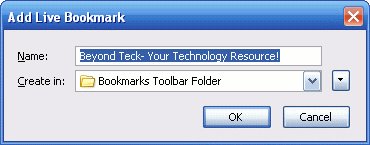
Click on OK

Here you can specify the name of the bookmark and which folder to create it in.
After you are done just click on okay and you are done!

To access the Bookmarks go to the Bookmark toolbar. There you will see the Beyond Teck folder(or the folder you stored it in) in Bookmarks menu. Then hover over the option that says "Beyond-Teck!" and you can see my recent posts.

More blogs about technology.
Email ThisBlogThis!Share to XShare to FacebookShare to Pinterest
Posted in | No comments
Newer Post Older Post Home

0 comments:

Post a Comment

Subscribe to: Post Comments (Atom)

Popular Posts

  • 5 great add-ons for Internet Explorer 7
    If you haven’t yet upgraded to Internet Explorer 7, I’d say its high time you do so. If you’re still using IE 6, you’re missing out on a lot...
  • WeTransfer Job Ad
    I like using WeTransfer to transfer things that don't fit in emails, mainly because the site is fast, has a large upload limit (2GB!) an...
  • Contact Me!
    Okay so you want to contact me for something? No Problem! E-Mail You can send all your questions , comments , tips (I need a lot of those)...
  • The Nintendo Wii..
    The first thing that comes to my mind is the Wheee! Firefox flick by Jeff Gill. Except this time the IE logo is replaced by the Nintendo Wi...
  • How to find the biggest files on Mac or Windows
    After a large amount of time, chances are that your hard drive will be cluttered with large files that you don't really need or use anym...
  • How we depend on technology in school
    Today I was just finishing up my Geo project and I realized (just like my other 'realization' moments that I've documented in t...
  • The reason why Windows Vista was experiencing problems
    Off late, my Windows Vista Ultimate install was experience a slew of problems, which might explain the reason I had 10 GB of error reporting...
  • Adium Update
    Looks like Adium (or Adium X) was updated. Now of course Adium isn't the messenger I use most (I use Trillian + Windows Live Messenger...
  • How to find out if a .exe process is spyware or virus
    Windows XP has thousands and thousands of .exe files, and usually a lot of those executables are running at any given time. But are all of t...
  • How to reduce PDF file sizes on a Mac
    Update : Doesn't seem like this method works well for all files, you may want to try out the link posted in the comments, as this seems ...

Categories

  • addons
  • adobe
  • ads
  • adsense
  • apple
  • audio
  • blackberry
  • blog
  • blogger
  • blogging
  • cars
  • cellphones
  • clean
  • code
  • comments
  • cricket
  • downloads
  • ebooks
  • email
  • error
  • file sharing
  • firefox
  • fixes
  • free
  • games
  • gas
  • Gmail
  • google
  • hack
  • hotmail
  • installs
  • instant messaging
  • internet
  • internet explorer
  • ipod
  • laptop
  • Linux
  • Live Writer
  • lol
  • Mac
  • mac. mail
  • mail
  • messenger
  • microsoft
  • Microsoft Word
  • money
  • msn
  • music
  • Musings
  • network
  • news
  • online
  • Outlook
  • page
  • peripherals
  • phones
  • photo
  • photoshop
  • php
  • plagiarism
  • problems
  • productivity
  • programming
  • projects
  • rant
  • Registry
  • Review
  • school
  • Screenshots
  • search
  • security
  • software
  • spam
  • speech
  • speed up windows
  • spyware
  • sysfader
  • technology
  • tip
  • tricks
  • tutorials
  • ubuntu
  • updates
  • video
  • virus
  • voip
  • web
  • wi-fi
  • Windows
  • Windows 7
  • Windows Vista
  • Windows XP
  • wireless
  • work
  • wtf
  • youtube

Blog Archive

  • ►  2013 (5)
    • ►  October (2)
    • ►  August (2)
    • ►  March (1)
  • ►  2012 (6)
    • ►  December (1)
    • ►  October (1)
    • ►  June (1)
    • ►  May (1)
    • ►  January (2)
  • ►  2011 (19)
    • ►  October (1)
    • ►  August (1)
    • ►  July (8)
    • ►  June (1)
    • ►  February (4)
    • ►  January (4)
  • ►  2010 (41)
    • ►  November (1)
    • ►  October (3)
    • ►  September (3)
    • ►  August (2)
    • ►  July (12)
    • ►  June (2)
    • ►  May (5)
    • ►  April (3)
    • ►  March (4)
    • ►  February (4)
    • ►  January (2)
  • ►  2009 (59)
    • ►  December (1)
    • ►  November (1)
    • ►  October (1)
    • ►  September (3)
    • ►  August (4)
    • ►  July (4)
    • ►  June (14)
    • ►  May (1)
    • ►  April (3)
    • ►  March (3)
    • ►  February (4)
    • ►  January (20)
  • ►  2008 (108)
    • ►  December (22)
    • ►  November (10)
    • ►  October (14)
    • ►  August (13)
    • ►  July (13)
    • ►  June (6)
    • ►  May (13)
    • ►  April (10)
    • ►  March (5)
    • ►  January (2)
  • ►  2007 (33)
    • ►  December (8)
    • ►  November (1)
    • ►  October (4)
    • ►  September (10)
    • ►  August (1)
    • ►  July (2)
    • ►  June (1)
    • ►  May (2)
    • ►  April (1)
    • ►  February (2)
    • ►  January (1)
  • ►  2006 (137)
    • ►  December (1)
    • ►  November (1)
    • ►  October (1)
    • ►  August (1)
    • ►  July (3)
    • ►  June (9)
    • ►  May (20)
    • ►  April (22)
    • ►  March (33)
    • ►  February (20)
    • ►  January (26)
  • ▼  2005 (55)
    • ►  December (12)
    • ►  November (19)
    • ►  October (9)
    • ▼  September (15)
      • How Computers Came to Life
      • My very own podcast!
      • Podcasting and communications
      • Cool Downloads
      • Nothing to say today!
      • All about networking
      • Networking , devices and memory!
      • Bits and Bites!
      • All about Processor!
      • Basics of the computer
      • E-mail and how it works
      • E-mail
      • Computers and Computer Parts
      • Who am I?
      • Enable live bookmarks
  • ►  2001 (1)
    • ►  January (1)
Powered by Blogger.

About Me

Unknown
View my complete profile